
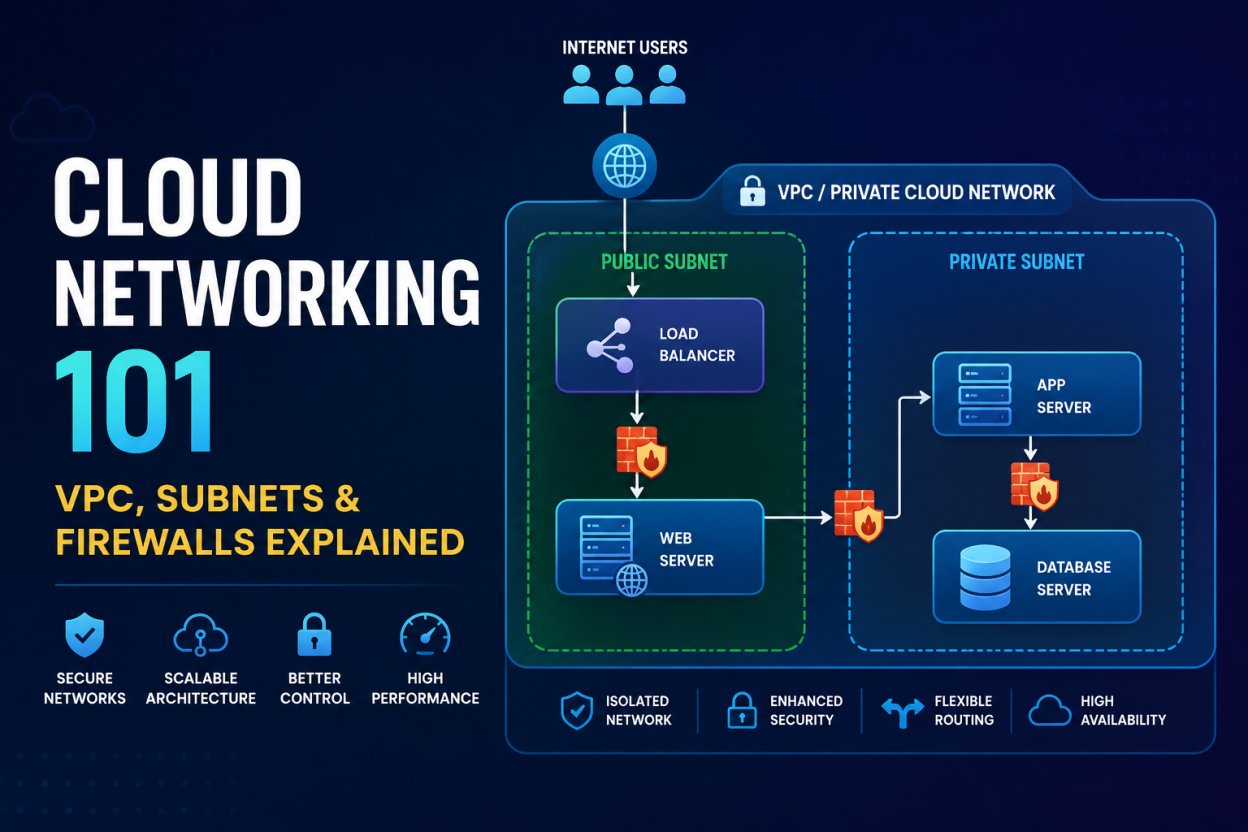
Cloud networking is one of the most important foundations of modern cloud infrastructure. Whether you are hosting a website, running a business application, deploying Kubernetes, or building a private server environment, networking decides how your systems communicate, how secure they are, and how easily they can scale.
In traditional hosting, many businesses simply rent a server, point a domain, and run the application. But in cloud environments, networking is more flexible. You can create private networks, separate public and private servers, control traffic with firewalls, connect multiple regions, and use load balancers to distribute traffic across many servers.
Cloud networking means designing and managing network resources inside a cloud platform, such as VPCs, subnets, firewalls, DNS, routing, and load balancers, so applications can communicate securely and reliably.
In this guide, we will explain the basics of cloud networking in simple language, using beginner-friendly examples.
What is Cloud Networking?
Cloud networking is the process of connecting cloud resources such as virtual machines, databases, containers, storage, and users through virtual networks.
In an on-premises setup, a business may have physical routers, switches, firewalls, and LAN cables inside its office or data center. In cloud networking, many of these same concepts exist, but they are virtual. Instead of buying a physical switch, you create a virtual private network. Instead of installing a hardware firewall, you configure cloud firewall rules.
For example, when you create a VPS or cloud server, it usually gets a public IP address so users can access it from the internet. But not every server should be public. Your database server, internal API, monitoring system, or backup server should usually stay private. Cloud networking helps you separate these resources properly.
A basic cloud network may include:
| Component | Purpose |
|---|---|
| VPC / Private Network | Isolated network for your cloud resources |
| Subnet | Smaller IP range inside the network |
| Firewall / Security Group | Controls allowed and blocked traffic |
| Load Balancer | Distributes traffic to multiple servers |
| DNS | Converts domain names into IP addresses |
| NAT / Gateway | Allows private servers to access the internet safely |
In short, cloud networking gives you more control over security, performance, and scalability.
What is a VPC?
A VPC, or Virtual Private Cloud, is your own isolated private network inside a cloud provider.
Think of it like renting a private section inside a large data center. Other customers also use the same cloud provider, but your network is separated from theirs. You decide which servers live inside your network, which IP ranges they use, and which services can communicate.
AWS describes a VPC as a virtual network that closely resembles a traditional network you would operate in your own data center. AWS VPCs can include subnets, IP addressing, route tables, gateways, endpoints, peering connections, flow logs, and VPN connections.
Simple VPC Example
Imagine you are hosting an e-commerce website.
You may create one VPC like this:
| Resource | Network Placement |
|---|---|
| Web server | Public subnet |
| Application server | Private subnet |
| Database server | Private subnet |
| Load balancer | Public subnet |
| Monitoring server | Private subnet |
The public-facing part of your application can receive traffic from users, while the database remains hidden from the public internet.
AWS VPC vs Hetzner Networks vs DigitalOcean VPC
Different cloud providers use slightly different names, but the idea is similar.
| Provider | Networking Name | Simple Explanation |
|---|---|---|
| AWS | VPC | Full-featured private cloud network with subnets, routes, gateways, NAT, peering, and security controls |
| Hetzner Cloud | Networks | Private networks with subnets and routes for connecting cloud servers privately |
| DigitalOcean | VPC | Private network interface for DigitalOcean resources, not accessible from the public internet by default |
DigitalOcean defines a VPC as a private network interface for collections of resources, and its VPC networks are inaccessible from the public internet and other VPC networks unless connected through features like peering. Hetzner Networks also support private network design using subnets and routes, where subnets divide the network into IP ranges and routes send traffic to a gateway.
For beginners, you can understand all of them as:
A VPC or private cloud network is a safe internal network where your cloud servers can communicate privately.
Subnets — Public vs Private
A subnet is a smaller section of a larger network.
For example, you may create a VPC with this IP range:
10.0.0.0/16Then divide it into smaller subnets:
10.0.1.0/24  → Public subnet
10.0.2.0/24  → Private application subnet
10.0.3.0/24  → Private database subnet
AWS explains a subnet as a range of IP addresses inside a VPC, and each subnet belongs to a single Availability Zone.
What is a Public Subnet?
A public subnet is a subnet that can communicate with the internet.
Usually, it contains:
- Web servers
- Load balancers
- Bastion hosts
- Reverse proxies
- VPN gateways
Example:
User → Internet → Load Balancer → Web ServerA public subnet is useful when a resource must be reachable from outside.
What is a Private Subnet?
A private subnet is not directly reachable from the public internet.
Usually, it contains:
- Database servers
- Internal APIs
- Backup servers
- Application workers
- Monitoring tools
- Kubernetes worker nodes
Example:
Web Server → Private App Server → Private DatabaseThis is more secure because even if someone knows the private IP address, they cannot directly access it from the internet.
Why Separate Public and Private Subnets?
Separating public and private subnets improves security and organization.
A common mistake beginners make is placing everything on one public server. This is simple at first, but risky as the business grows. If your database is publicly exposed, attackers may try to brute-force it, scan it, or exploit weak credentials.
A better architecture is:
Internet
   ↓
Load Balancer
   ↓
Public Web Subnet
   ↓
Private App Subnet
   ↓
Private Database Subnet
This keeps sensitive systems away from direct public access.
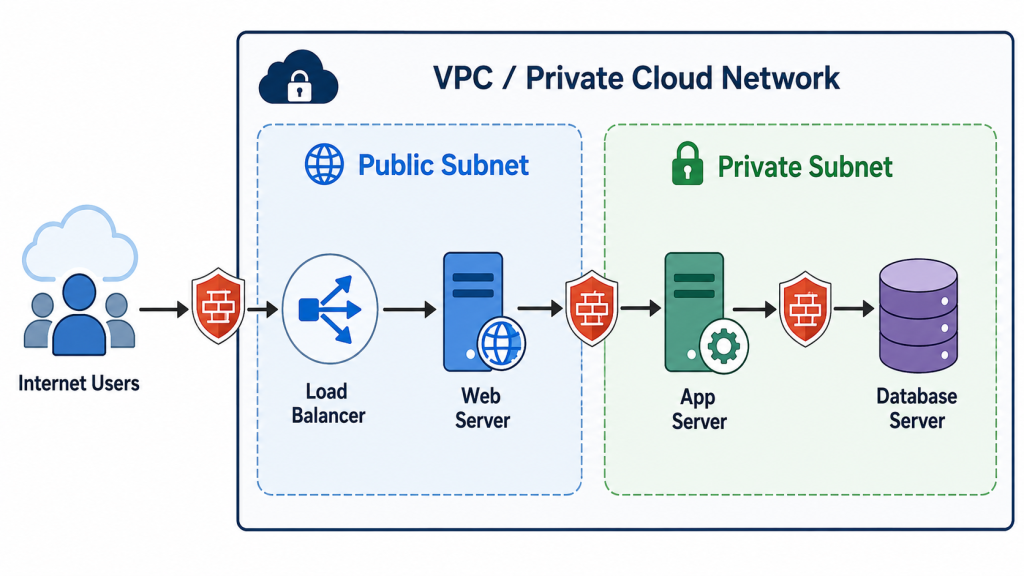
Image 1: Cloud Network Architecture: Public vs Private Subnets
Security Groups & Firewalls in Cloud
A firewall controls what traffic is allowed or blocked.
In cloud environments, firewalls may be called:
- Security Groups
- Cloud Firewalls
- Network ACLs
- Firewall Rules
The main purpose is the same: allow only required traffic and block everything else.
For example:
| Service | Port | Should Be Public? |
|---|---|---|
| HTTP | 80 | Yes |
| HTTPS | 443 | Yes |
| SSH | 22 | Only from trusted IP |
| MySQL | 3306 | No |
| PostgreSQL | 5432 | No |
| Redis | 6379 | No |
AWS security groups work as virtual firewalls for associated resources, controlling inbound and outbound traffic. AWS also notes that security groups are stateful, meaning response traffic is automatically allowed for an allowed request.
Stateful vs Stateless Firewalls
This is an important cloud networking concept.
Stateful Firewall
A stateful firewall remembers connections.
Example:
Server sends request to internet
Internet sends response back
Firewall allows the response automatically
Most beginner-friendly cloud firewalls are stateful.
Hetzner Cloud Firewalls are also stateful and track individual network connections, allowing response traffic automatically when a server sends an outgoing request.
Stateless Firewall
A stateless firewall does not remember previous connections.
If you allow inbound traffic, you may also need to allow outbound response traffic manually.
AWS Network ACLs are stateless and work at the subnet level. AWS notes that NACLs do not save information about previously sent or received traffic, so responses are not automatically allowed unless rules permit them.
Example Firewall Rules
For a web server:
Allow inbound TCP 80 from 0.0.0.0/0
Allow inbound TCP 443 from 0.0.0.0/0
Allow inbound TCP 22 only from office IP
Deny all other inbound traffic
For a database server:
Allow inbound TCP 3306 only from app server private IP
Deny public access
This is the basic idea of least-privilege networking.
Load Balancers in Cloud Networks
A load balancer distributes incoming traffic across multiple servers.
Instead of sending all users to one server, a load balancer spreads requests to multiple backend servers.
Example:
User Traffic
    ↓
Load Balancer
    ↓
Server 1
Server 2
Server 3
AWS Elastic Load Balancing distributes incoming traffic across multiple targets such as EC2 instances, containers, and IP addresses, monitors target health, and routes traffic only to healthy targets. Hetzner also describes load balancers as a way to distribute traffic across infrastructure and create an internet-facing entry point into cloud networks.
Common Load Balancing Methods
| Method | Meaning |
|---|---|
| Round Robin | Sends requests one by one to each server |
| Least Connections | Sends traffic to the server with fewer active connections |
| Health Check Based | Sends traffic only to healthy servers |
| IP Hash | Sends the same client to the same backend server |
When Do You Need a Load Balancer?
You need a load balancer when:
- One server is no longer enough
- You want high availability
- You want zero-downtime deployment
- You want traffic distributed between multiple servers
- You want SSL/TLS termination in one place
- You want automatic failover if one server goes down
For small websites, one VPS may be enough. But for business-critical applications, a load balancer becomes very important.
DNS in Cloud Environments
DNS stands for Domain Name System.
It converts a domain name like:
example.cominto an IP address like:
192.0.2.10Cloudflare explains DNS as the phonebook of the internet because it translates human-readable domain names into machine-readable IP addresses.
Common DNS Records
| Record | Purpose |
|---|---|
| A Record | Points domain to IPv4 address |
| AAAA Record | Points domain to IPv6 address |
| CNAME | Points one domain name to another |
| MX | Mail server record |
| TXT | Verification, SPF, DKIM, DMARC |
| NS | Nameserver record |
Route 53, Cloudflare, and Internal DNS
In AWS, Route 53 is a managed DNS service that supports domain registration, DNS routing, and health checking.
Cloudflare DNS is an authoritative DNS service that also provides performance, reliability, and security features such as protection against DDoS attacks and route leaks.
In cloud environments, DNS can be public or private.
Public DNS
Public DNS is used for domains accessed by users.
Example:
www.example.com → Public Load Balancer IPInternal DNS
Internal DNS is used inside private networks.
Example:
db.internal → 10.0.3.10
api.internal → 10.0.2.20
This makes internal communication easier and safer because applications do not need to connect using public IP addresses.
Network Architecture Best Practices
Good cloud networking is not only about making things work. It is about making them secure, scalable, and easy to manage.
Here are the most important best practices.
1. Use Private Subnets for Databases
Your database should not be publicly accessible.
Instead of this:
Internet → DatabaseUse this:
Internet → Web Server → App Server → Private DatabaseThis reduces risk and protects sensitive business data.
2. Open Only Required Ports
Do not open all ports to the internet.
Avoid rules like:
Allow all traffic from 0.0.0.0/0Better:
Allow 80/443 from anywhere
Allow SSH only from trusted IP
Allow database only from app server
AWS also recommends restricting SSH and RDP access to specific IP ranges instead of allowing access from anywhere.
3. Use a Bastion Host or VPN
A bastion host is a secure jump server used to access private servers.
Example:
Admin → Bastion Host → Private ServerEven better, use a VPN or zero-trust access solution so SSH is not directly exposed to the public internet.
4. Separate Environments
Keep production, staging, and development environments separate.
Example:
Production VPC
Staging VPC
Development VPC
This prevents testing mistakes from affecting live customers.
5. Use Load Balancers for Production Apps
A load balancer improves reliability. If one server fails, traffic can be sent to another healthy server.
For production applications, this is much better than depending on only one backend server.
6. Monitor Network Traffic
Use logs and monitoring tools to understand traffic patterns.
Monitor:
- Firewall denies
- High bandwidth usage
- Failed SSH attempts
- Unusual outbound traffic
- Load balancer health checks
- DNS changes
AWS VPC Flow Logs, for example, capture information about IP traffic going to and from network interfaces in a VPC.
7. Use Clear IP Planning
Before creating subnets, plan your IP ranges.
Example:
10.0.1.0/24 → Public servers
10.0.2.0/24 → Application servers
10.0.3.0/24 → Databases
10.0.4.0/24 → Monitoring
10.0.5.0/24 → Kubernetes
Good IP planning prevents confusion later.
Example: Simple Cloud Network for a Business Website
Here is a beginner-friendly architecture for a business web application:
Internet Users
      ↓
Cloudflare / DNS
      ↓
Load Balancer
      ↓
Web Servers in Public Subnet
      ↓
App Servers in Private Subnet
      ↓
Database in Private Subnet
Firewall rules:
Load Balancer:
Allow 80/443 from internet

Web Servers:
Allow traffic only from Load Balancer
Allow SSH only from admin VPN

App Servers:
Allow traffic only from Web Servers

Database:
Allow database port only from App Servers
Block public access
This design is secure, scalable, and suitable for many small to medium business applications.
Common Cloud Networking Mistakes
Beginners often make these mistakes:
| Mistake | Risk |
|---|---|
| Opening all ports publicly | Easy target for attackers |
| Putting database on public IP | Data exposure risk |
| No firewall rules | Uncontrolled traffic |
| No subnet planning | Messy infrastructure |
| No load balancer | Single point of failure |
| Using public IPs for internal traffic | Higher exposure and poor design |
| No DNS documentation | Difficult troubleshooting |
The goal is simple: expose only what users need, and keep everything else private.
Final Thoughts
Cloud networking may look complex at first, but the basics are easy to understand when you break them into layers.
A VPC gives you an isolated cloud network.
A subnet divides that network into smaller sections.
A firewall controls who can access what.
A load balancer distributes traffic across servers.
DNS connects human-friendly domain names to cloud resources.
Once you understand these concepts, you can design cloud infrastructure that is more secure, reliable, and ready to scale.
For businesses, this matters a lot. A poorly designed network can lead to downtime, security risks, and difficult troubleshooting. A well-designed cloud network gives your business a strong foundation for growth.
At BISUP, we help businesses deploy, secure, and manage cloud infrastructure with proper networking, firewall configuration, monitoring, and scalable server architecture.
FAQ
What is a VPC used for?
A VPC is used to create an isolated private network inside a cloud provider. It allows you to run servers, databases, load balancers, and other resources in a controlled network environment.
Is a VPC the same as a subnet?
No. A VPC is the larger private network, while a subnet is a smaller IP range inside that VPC. For example, one VPC can contain multiple public and private subnets.
What is the difference between a public and private subnet?
A public subnet can communicate directly with the internet, usually through an internet gateway or public IP. A private subnet is not directly reachable from the internet and is commonly used for databases, internal APIs, and backend services.
What is a cloud firewall?
A cloud firewall controls inbound and outbound traffic to cloud resources. It allows only approved traffic, such as HTTP, HTTPS, or SSH from trusted IP addresses.
What is the difference between a security group and a network ACL?
A security group usually works at the resource level, such as a server or network interface, and is stateful. A network ACL works at the subnet level and is often stateless, depending on the provider.
Is Cloudflare a CDN or DNS?
Cloudflare can be both. It provides DNS services and also works as a CDN, reverse proxy, DDoS protection layer, and web security platform.
Do small businesses need cloud networking?
Yes. Even small businesses benefit from proper cloud networking because it improves security, performance, and reliability. A basic setup with firewall rules, private database access, and DNS management is already a strong start.


