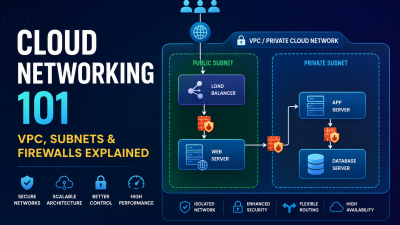
What is Kubernetes? Simple Definition
Kubernetes, also known as K8s, is an open-source platform used to run, manage, scale, and automatically recover containerized applications. In simple words, Kubernetes helps you keep your applications running smoothly even when traffic increases, servers fail, or new updates are deployed.
For example, imagine you have an online shopping website running inside containers. If more customers visit during a sale, Kubernetes can help run more copies of your application. If one server goes down, Kubernetes can move the application to another healthy server automatically.
That is why Kubernetes is widely used by cloud platforms, SaaS companies, e-commerce businesses, and teams that run modern applications at scale.
Why Was Kubernetes Created?
Before Kubernetes became popular, large technology companies already had the problem of running thousands of applications across many servers. Google solved this internally using a system called Borg, which helped them manage large-scale workloads.
Kubernetes was later created based on ideas from Google’s experience of running containers at massive scale. It was released as an open-source project so that other companies could also manage containerized applications more efficiently.
Today, Kubernetes is one of the most important tools in cloud computing and DevOps.
Core Kubernetes Concepts With Simple Analogies
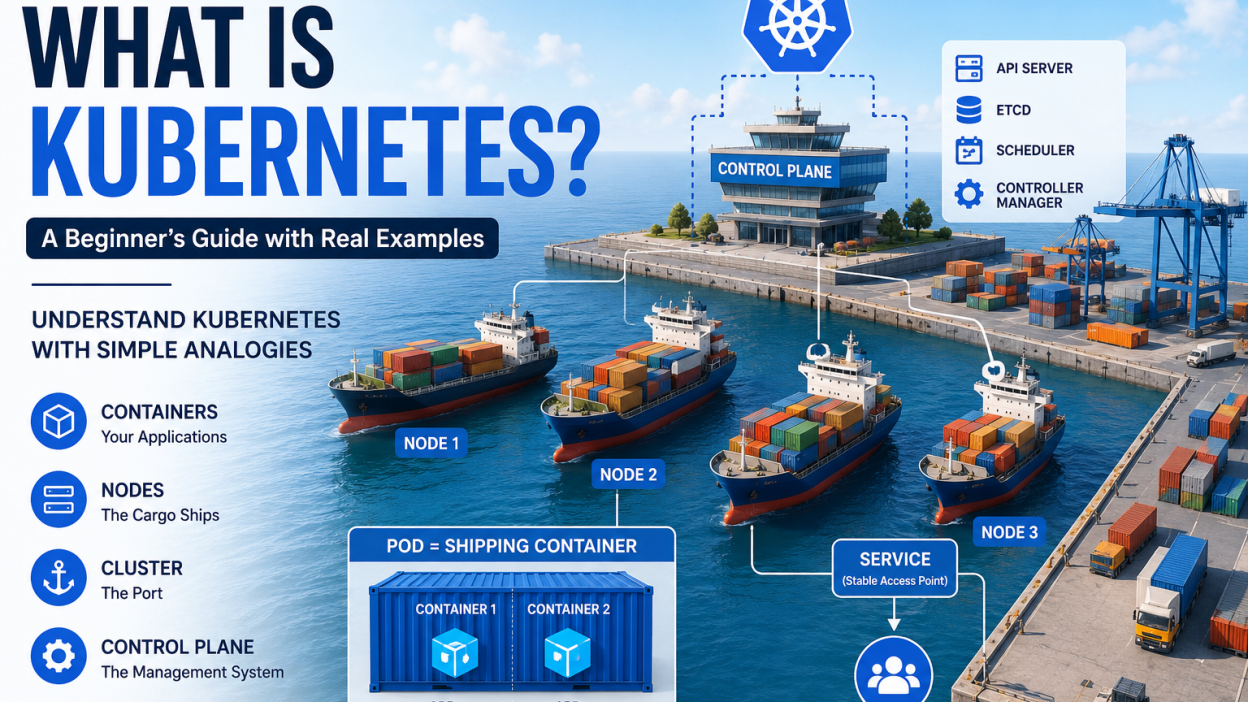
Kubernetes can feel confusing at first because it uses many new terms. But if we compare it to a shipping system, it becomes much easier to understand.
Pods = Shipping Containers
A Pod is the smallest unit that Kubernetes runs. A Pod usually contains one application container, but it can also contain multiple closely related containers.
Think of a Pod like a shipping container. Inside that container, you keep your application and everything it needs to run. Kubernetes does not usually manage individual containers directly. Instead, it manages Pods.
For example, if you have a Node.js application, Kubernetes can run it inside a Pod.
Nodes = Cargo Ships
A Node is a server where Pods run. A node can be a physical server, a virtual machine, or a cloud server.
Using the shipping analogy, a node is like a cargo ship. The ship carries many containers. Similarly, one node can run many Pods.
For example, if your business has three cloud servers, Kubernetes can use those servers as nodes and place application Pods on them.
Cluster = Port or Shipping Network
A Kubernetes cluster is a group of nodes working together. It includes the servers that run your applications and the control system that manages them.
Think of a cluster as the full shipping port or shipping network. It decides where containers should go, which ship should carry them, and what should happen if one ship has a problem.
Deployment = Manager of Application Copies
A Deployment tells Kubernetes how many copies of your application should run.
For example, you can tell Kubernetes:
“Always keep three copies of my website running.”
If one copy crashes, Kubernetes automatically starts a new one.
Service = Stable Access Point
Pods can be created and destroyed anytime, so their internal addresses can change. A Service gives users or other applications a stable way to access the running Pods.
For example, your website may have several backend Pods, but users should not need to know which Pod is currently handling their request. A Kubernetes Service handles that routing.
ConfigMap and Secret = Configuration Storage
Applications often need configuration values such as database hostnames, API URLs, or environment settings.
A ConfigMap stores normal configuration data. A Secret stores sensitive data such as passwords, tokens, or private keys.
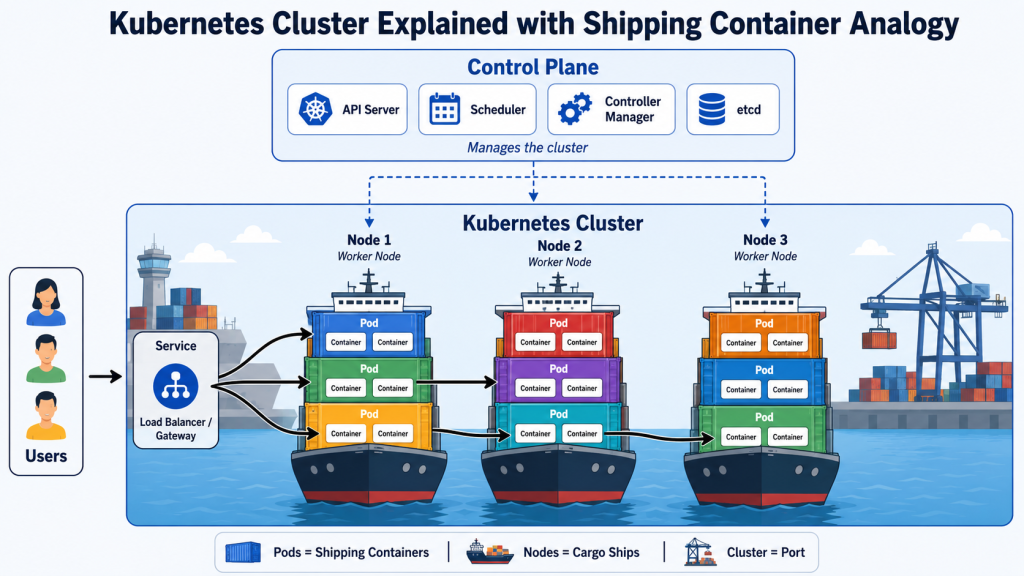
Image 1: Kubernetes Cluster Explained with Shipping Container Analogy
Kubernetes Architecture Explained
Kubernetes architecture has two main parts:
- Control Plane
- Worker Nodes
The control plane makes decisions and manages the cluster. Worker nodes run the actual applications.
Control Plane
The control plane is like the brain of Kubernetes. It checks the current state of the cluster and makes decisions to match the desired state.
For example, if you asked Kubernetes to run five copies of an application but only four are running, the control plane will notice this and create one more copy.
The main control plane components are:
API Server
The API server is the main communication point of Kubernetes. When you run a command using kubectl, your request goes to the API server.
For example:
kubectl get pods
This command asks the Kubernetes API server to show the list of running Pods.
etcd
etcd is a database used by Kubernetes to store cluster information. It stores details about nodes, Pods, Services, Deployments, and configuration.
You can think of etcd as Kubernetes’ memory.
Scheduler
The scheduler decides where a new Pod should run. It checks available nodes and selects the best one based on resources such as CPU and memory.
For example, if Node 1 is already heavily loaded and Node 2 has free resources, the scheduler may place the new Pod on Node 2.
Controller Manager
The controller manager watches the cluster and makes sure everything matches the desired state.
For example, if a Pod crashes, the controller manager helps Kubernetes create a replacement.
Worker Nodes
Worker nodes are the servers that run your application workloads.
Each worker node usually includes:
Kubelet
The kubelet is an agent that runs on each node. It communicates with the control plane and makes sure the required Pods are running.
Container Runtime
The container runtime is the software that actually runs containers. Common examples include containerd and CRI-O.
Kube-proxy
Kube-proxy helps manage networking inside the Kubernetes cluster. It allows traffic to reach the correct Pods and Services.
Kubernetes vs Docker Compose
Docker Compose and Kubernetes are both used to run containerized applications, but they are designed for different levels of complexity.
Docker Compose is simple and great for local development or small setups. Kubernetes is more powerful and better for production environments where scaling, self-healing, and automation are important.
| Feature | Docker Compose | Kubernetes |
|---|---|---|
| Best for | Local development and small apps | Production, scaling, and complex apps |
| Setup difficulty | Easier | More complex |
| Scaling | Basic manual scaling | Advanced automatic scaling |
| Self-healing | Limited | Strong self-healing |
| Load balancing | Basic | Built-in Service-based load balancing |
| Multi-server support | Limited | Designed for multiple nodes |
| Rolling updates | Limited | Built-in rolling updates |
| Learning curve | Beginner-friendly | Higher learning curve |
Simple Example
If you are developing a small website with a database on your laptop, Docker Compose is usually enough.
But if your website has thousands of users, multiple services, traffic spikes, and needs high availability, Kubernetes becomes more useful.
Real-World Use Cases of Kubernetes
1. E-commerce Website Scaling
Imagine an online store preparing for a festival sale. Normally, the website gets 500 visitors per day. During the sale, it may suddenly receive 50,000 visitors.
Without proper scaling, the website may become slow or go offline.
With Kubernetes, the business can run multiple copies of the application. When traffic increases, Kubernetes can help scale the application so more users can be served.
For example:
- Normal day: 3 application Pods
- Sale day: 20 application Pods
- After sale: back to 3 Pods
This helps businesses control performance and cost.
2. SaaS Platforms
A SaaS platform usually has many parts:
- Frontend application
- Backend API
- Database
- Authentication service
- Billing service
- Notification service
- Analytics service
Kubernetes helps manage these services in a structured way. Each service can run separately, scale separately, and be updated without affecting the full system.
For example, if the billing service needs more resources than the notification service, Kubernetes can scale only the billing part.
3. Microservices Applications
In a traditional application, everything is often built as one large system. In microservices architecture, the application is divided into smaller independent services.
For example, an online food delivery platform may have:
- User service
- Restaurant service
- Order service
- Payment service
- Delivery tracking service
- Notification service
Kubernetes is useful because it can manage all these small services across multiple servers.
4. High Availability Applications
Some businesses cannot afford downtime. For example:
- Banking systems
- Healthcare systems
- Online learning platforms
- Booking platforms
- Payment gateways
Kubernetes helps improve availability by restarting failed Pods, moving workloads to healthy nodes, and keeping multiple copies of applications running.
5. DevOps and CI/CD Pipelines
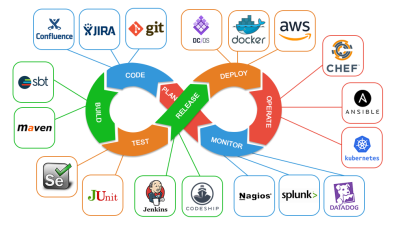
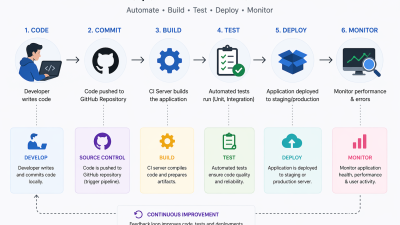
Kubernetes is commonly used with CI/CD pipelines. When developers push new code, the pipeline can build a container image and deploy it to Kubernetes.
This allows businesses to release updates faster and more safely.
For example:
- Developer pushes code to GitHub
- CI/CD tool builds Docker image
- Image is pushed to registry
- Kubernetes deploys the new version
- Old version is replaced using rolling update
Do Small Businesses Need Kubernetes?
The honest answer is: not always.
Kubernetes is powerful, but it is not required for every business. For many small businesses, a VPS, shared hosting, managed hosting, or simple Docker setup may be enough.
Kubernetes May Not Be Needed If:
- You have a simple company website
- You run a small WordPress site
- Your application has low traffic
- You do not have a DevOps team
- Your app does not need complex scaling
- You want the simplest and cheapest hosting option
For example, a local restaurant website or small business portfolio does not need Kubernetes.
Kubernetes Makes Sense If:
- Your application has growing traffic
- You run multiple services
- You need high availability
- You want automatic scaling
- You use microservices
- You have frequent deployments
- Your business depends heavily on application uptime
- You have a technical team or managed DevOps provider
For example, a SaaS product, fintech platform, e-commerce store, or large API-based application may benefit from Kubernetes.
Best Practical Advice
Small businesses should not use Kubernetes just because it is popular. They should use it only when the application complexity, traffic, uptime requirement, or scaling needs justify it.
A good approach is:
Start simple. Use VPS, managed cloud, or Docker first. Move to Kubernetes when the business and application actually need it.
Getting Started: Deploy Your First App on Kubernetes
If you are a beginner, the easiest way to try Kubernetes is by using Minikube. Minikube lets you run a small Kubernetes cluster on your local computer.
Step 1: Install Minikube and kubectl
You need two tools:
minikube— creates a local Kubernetes clusterkubectl— command-line tool to control Kubernetes
After installation, start Minikube:
minikube start
Check cluster status:
kubectl cluster-info
Step 2: Create a Simple Deployment
You can deploy a sample NGINX application using this command:
kubectl create deployment hello-kubernetes --image=nginx
Check if the Pod is running:
kubectl get pods
Step 3: Expose the Application
To access the application, expose it using a Service:
kubectl expose deployment hello-kubernetes --type=NodePort --port=80
Now get the service URL:
minikube service hello-kubernetes --url
Open the URL in your browser, and you should see the NGINX welcome page.
Basic Kubernetes YAML Manifest
In real projects, Kubernetes resources are usually written in YAML files.
Here is a simple example:
apiVersion: apps/v1
kind: Deployment
metadata:
  name: hello-kubernetes
spec:
  replicas: 3
  selector:
    matchLabels:
      app: hello-kubernetes
  template:
    metadata:
      labels:
        app: hello-kubernetes
    spec:
      containers:
        - name: nginx
          image: nginx:latest
          ports:
            - containerPort: 80
This file tells Kubernetes to run three copies of an NGINX application.
Apply the file:
kubectl apply -f deployment.yaml
Check the Deployment:
kubectl get deployments
Check the Pods:
kubectl get pods
If one Pod fails, Kubernetes will try to replace it automatically.
Common Benefits of Kubernetes
Automatic Scaling
Kubernetes can scale applications based on traffic and resource usage.
Self-Healing
If a Pod fails, Kubernetes can restart it. If a node fails, Kubernetes can move workloads to another node.
Rolling Updates
Kubernetes can update applications without taking everything offline at once.
Better Resource Usage
Kubernetes can place workloads across available nodes efficiently.
Portability
Kubernetes can run on many environments, including public cloud, private cloud, on-premise servers, and hybrid infrastructure.
Common Challenges of Kubernetes
Kubernetes is powerful, but it also has challenges.
It Has a Learning Curve
Beginners need to understand Pods, Services, Deployments, networking, storage, and security.
It Requires Proper Monitoring
A Kubernetes cluster should be monitored properly. You need visibility into CPU, memory, logs, network traffic, and application health.
Security Must Be Configured Carefully
Kubernetes security includes role-based access control, network policies, image security, secrets management, and cluster hardening.
It Can Be Overkill
For small websites or simple applications, Kubernetes may add unnecessary complexity.
Kubernetes for Businesses: Final Recommendation
Kubernetes is one of the most powerful platforms for running modern containerized applications. It helps businesses scale applications, reduce downtime, automate deployments, and manage complex systems more efficiently.
However, Kubernetes is not always the first step. For small websites and simple applications, traditional hosting or VPS hosting may be more practical. For growing applications, SaaS platforms, e-commerce systems, and microservices-based products, Kubernetes can be a strong long-term solution.
At BISUP, we help businesses choose the right infrastructure based on their actual needs. Whether you need VPS hosting, Docker deployment, cloud infrastructure, monitoring, or Kubernetes-based architecture, the right solution should always match your business size, budget, and growth plan.
Conclusion
Kubernetes can be explained simply as a system that manages containers across multiple servers. It keeps applications running, scales them when needed, and helps teams deploy updates safely.
For beginners, Kubernetes may look complex at first. But once you understand Pods, Nodes, Clusters, Deployments, and Services, the concept becomes much clearer.
If your application is growing and you need better scalability, reliability, and automation, Kubernetes may be the next step for your business.
FAQ
Is Kubernetes hard to learn?
Kubernetes can be hard at the beginning because it has many new concepts such as Pods, Nodes, Services, Deployments, and ConfigMaps. However, beginners can start with Minikube and simple examples before moving to production-level clusters.
Kubernetes vs Docker: what is the difference?
Docker is mainly used to build and run containers. Kubernetes is used to manage containers across multiple servers. In simple words, Docker creates and runs containers, while Kubernetes organizes, scales, and manages them in production.
Do I need Kubernetes for a small website?
Usually, no. A small business website, portfolio site, or basic WordPress site does not need Kubernetes. Traditional hosting, VPS hosting, or managed hosting is usually enough.
When should a business use Kubernetes?
A business should consider Kubernetes when it has multiple services, high traffic, frequent deployments, scaling needs, or strong uptime requirements.
Can Kubernetes run on a VPS?
Yes, Kubernetes can run on VPS servers. However, production Kubernetes needs proper planning for networking, storage, security, monitoring, and backups.
Is Kubernetes only for large companies?
No. Kubernetes is used by large companies, startups, SaaS platforms, and growing businesses. But it should be used only when the application requirements justify the complexity.
FAQ Schema JSON-LD
{
  "@context": "https://schema.org",
  "@type": "FAQPage",
  "mainEntity": [
    {
      "@type": "Question",
      "name": "Is Kubernetes hard to learn?",
      "acceptedAnswer": {
        "@type": "Answer",
        "text": "Kubernetes can be hard at the beginning because it has many new concepts such as Pods, Nodes, Services, Deployments, and ConfigMaps. However, beginners can start with Minikube and simple examples before moving to production-level clusters."
      }
    },
    {
      "@type": "Question",
      "name": "Kubernetes vs Docker: what is the difference?",
      "acceptedAnswer": {
        "@type": "Answer",
        "text": "Docker is mainly used to build and run containers. Kubernetes is used to manage containers across multiple servers. Docker creates and runs containers, while Kubernetes organizes, scales, and manages them in production."
      }
    },
    {
      "@type": "Question",
      "name": "Do I need Kubernetes for a small website?",
      "acceptedAnswer": {
        "@type": "Answer",
        "text": "Usually, no. A small business website, portfolio site, or basic WordPress site does not need Kubernetes. Traditional hosting, VPS hosting, or managed hosting is usually enough."
      }
    },
    {
      "@type": "Question",
      "name": "When should a business use Kubernetes?",
      "acceptedAnswer": {
        "@type": "Answer",
        "text": "A business should consider Kubernetes when it has multiple services, high traffic, frequent deployments, scaling needs, or strong uptime requirements."
      }
    },
    {
      "@type": "Question",
      "name": "Can Kubernetes run on a VPS?",
      "acceptedAnswer": {
        "@type": "Answer",
        "text": "Yes, Kubernetes can run on VPS servers. However, production Kubernetes needs proper planning for networking, storage, security, monitoring, and backups."
      }
    }
  ]
}