I still remember the first time I logged into a DirectAdmin panel. I had no idea what half the icons meant, I clicked on something called “MX Records” thinking it might be a game setting, and within ten minutes I had somehow locked myself out of my own email. Not exactly a great start.
That was years ago. Since then I’ve spent a huge part of my working life inside control panels, setting up hosting for clients, moving sites from one server to another, fixing things at 2 AM when something broke, and now running a hosting company where DirectAdmin is one of the panels we offer. So when people ask me if DirectAdmin is good for beginners, I don’t give them a sales pitch. I tell them what actually happened to me, and what I’ve seen happen to a lot of first time users since.
Short answer: yes, it’s good for beginners. But there are a few honest things I wish someone had told me back then.
My First Impression Was “This Looks Old”
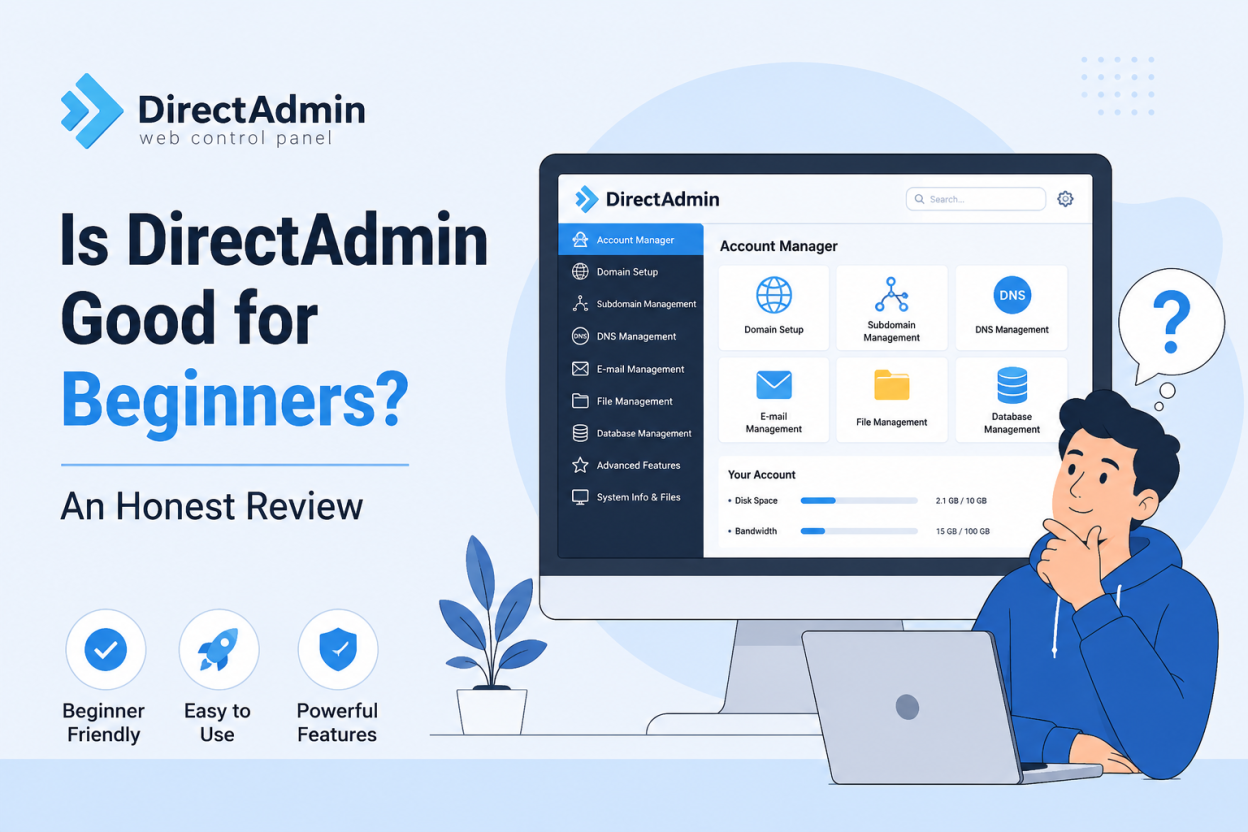
Let’s get this out of the way first. If you’ve used cPanel hosting before, or you’re used to modern app dashboards, your first reaction to DirectAdmin is probably going to be the same as mine was. It looks a bit dated. The default theme is plain and simple. There’s no fancy setup screen walking you through your first website step by step.
I’ll admit this put me off at first. I thought if the panel looked this basic, everything else about it must be basic too. I was wrong, and it took me a couple of weeks of actually using it to figure that out.
What I eventually understood is that DirectAdmin isn’t trying to impress you with looks. It’s built so you can find things fast once you know where they are. Every option sits in a place that makes sense, pages load quickly even on cheaper servers, and there’s nothing extra fighting for your attention. Once you get past the first week, the “old looking” feeling actually turns into “this is fast and simple.”
The Learning Curve Is Real, But Shorter Than You’d Think
I won’t lie and say there’s no learning curve, because there is one. If this is the first time you’re touching any hosting panel at all, words like DNS, nameservers, PHP version, and cron job are going to sound like a different language. But that’s true for any hosting panel, not just DirectAdmin.
What I noticed after watching a lot of beginners go through this is that DirectAdmin is easier to understand once the first few days are over. Everything is split into three simple roles: Admin, Reseller, and User. If you’re just managing your own website as a normal user, you won’t even see the server level settings that don’t apply to you. That alone removes a lot of the “what does this button do” worry I remember having in the beginning.
If I had to rank it against the panels I’ve used a lot, cPanel and Plesk included, I’d put DirectAdmin somewhere in the middle. It’s not the most beginner friendly looking panel out there, but it’s a lot less overwhelming than cPanel, which throws a hundred icons at you on day one.
Where DirectAdmin Actually Helps Beginners
This is the part most reviews skip, because they’re too busy listing features instead of talking about what a beginner actually needs to do. For me, the real test is simple: can you upload a website, set up an email account, add an SSL certificate, and make a backup without needing to call support?
I’ve watched people with zero hosting experience do all four of these in DirectAdmin within their first hour. The file manager is easy to understand. Setting up an email account takes one form. Adding an SSL certificate through Let’s Encrypt is basically one click now. And the backup tool, once you find it, is one of the more reliable ones I’ve used on any panel.
The other thing I really like, and this matters more the longer you use it, is how light DirectAdmin is on server resources. I’ve run it comfortably on small VPS plans where cPanel would have felt slow or would have cost a lot more. If you’re a beginner who’s also watching your budget, and let’s be honest most beginners are, this matters a lot more than people realize.
Where It Struggles for New Users
I try to be fair, so I’m not going to pretend everything is perfect for a first timer.
The official documentation is okay, but not as friendly as I’d like. A lot of the help pages assume you already know basic server terms. When I got stuck early on, I ended up looking at community forums and random blog posts more than the official guides, which isn’t great when you’re brand new to all this.
Customization is another honest weak point. If you want to change how the panel looks or add your own branding, DirectAdmin doesn’t make that easy for a beginner. It’s possible, I’ve done it myself, but it means editing files directly instead of clicking through a simple settings page. No beginner is going to try this in their first month, and honestly they shouldn’t need to.
There’s also the community size to think about. Because cPanel has been around longer and is more common, there are simply more tutorials and YouTube videos built around it. When I hit a DirectAdmin specific problem early on, I sometimes had to search a bit harder to find someone who had the same issue. That gap has gotten smaller over the years, but it’s still there a little.
The Moment DirectAdmin Made Sense to Me
I remember the exact task that changed my mind about DirectAdmin, from “it’s okay” to “this is actually good.” I was managing a few client websites and needed to set up email forwarding with a slightly unusual rule, forwarding to more than one address with a backup catch all. On the panel I used before, this always felt like a fight with the interface. In DirectAdmin, it took me about three minutes and worked exactly how I expected on the first try.
That’s when I understood what long time DirectAdmin users mean when they say it just gets out of your way. It’s not trying to be clever or add extra steps to look more advanced. It simply does what you ask it to do, quickly, and lets you move on with your day.
Who I’d Actually Recommend It To
If you want a panel that holds your hand through every single click with pop up tips and setup wizards, I won’t pretend DirectAdmin is that. It expects you to read a menu and figure things out, rather than guiding you through every step.
But if you’re willing to spend a week getting used to the basics, which is true for any hosting panel worth using, I think DirectAdmin is actually one of the better places to start. It’s light, it’s stable, it doesn’t throw extra complexity at you, and once you know where the five or six things you actually use are, you’ll probably forget it ever felt confusing at all.
I’ve set up non technical clients on DirectAdmin hosting who, within two weeks, were managing their own email accounts and updating their sites without ever calling support. That’s a pretty good sign that “beginner friendly” holds up in real use, not just as a marketing line.
My Honest Bottom Line
Is DirectAdmin Hosting good for beginners? After using it for years and watching plenty of first timers go through the same process I did, my honest answer is yes, with one small note. Beginner friendly doesn’t mean there’s no learning curve at all. Nothing in web hosting is truly zero effort, and I’d be lying if I said otherwise.
What I can say is that DirectAdmin gets you comfortable faster than people expect, it doesn’t punish you with things you don’t need, and it tends to get better the more you use it. That’s more than I can say for some flashier looking panels I’ve tried that turned out to be all looks and not much else underneath.
If you’re just starting out and looking into directadmin hosting as an option, my honest advice is this: don’t judge it by that plain login screen. Give yourself a week of actually clicking around, making a test email account, uploading a small site, and trying out the backup tool. That’s exactly how I got comfortable with it, and it’s the same path I’ve seen work for almost everyone I’ve introduced to it since.