A formal request letter is given to the.np registrar when requesting a free.np domain in Nepal is known as a .com.np cover letter. The applicant’s name, requested domain name, nameservers, contact information, and signature should all be included. The free NP Cover Letter Generator from BISUP makes it simple to construct the right format.
You must choose a domain name that matches your name, business name, brand, product, or service in order to register a .com.np domain in Nepal. A signed cover letter, legitimate nameservers, and supporting documentation are also required.
With the help of BISUP’s free NP Cover Letter Generator, you can draft an appropriate cover letter for submission on register.com.np. Once the letter has been generated, you can upload it to the official.np domain registration page along with your passport, citizenship, business registration, or any other necessary document.
What is a .com.np Domain?
Individuals, companies, startups, brands, organizations, and service providers in Nepal frequently use a.com.np domain extension.
For instance:
- Brandname.com.np
- Businessname.com.np
- Productname.com.np
- Yourname.com.np
It is a component of Nepal’s official.np country-code domain system.
Because.com.np domains appear local, reliable, and relevant to Nepali consumers, many Nepali businesses favour them. Businesses can establish a professional online identity with a website, company email, and digital presence by using a.com.np domain.
For instance, a business can utilise:
- Business website: companyname.com.np
- Support: info@companyname.com.np
- Email: support@companyname.com.np. Instead of just using a free email address.
This gives the company a more polished appearance.
Why is a Cover Letter Required for Registration of a.com.np Domain?
The registry must confirm that the requested domain name is associated with the applicant when a .com.np domain is applied for.
For this reason, a cover letter is necessary.
The cover letter functions as an official request. The hostmaster is informed:
- Who is submitting a domain application?
- Which domain name is being asked for?
- Why the candidate qualifies for that domain
- Which nameservers are going to be used?
- Which documents are included for confirmation?
A concise cover letter lowers the likelihood of rejection and speeds up the registry’s evaluation of your application.
If your cover letter has missing details, improper nameservers, no signature, or mismatched information, your requests for the np domain could be denied or delayed.
What a .com.np Should be included in the Cover Letter?
A good .com.np cover letter should be straightforward, official, and precise.
It should consist of:
- Date
- The hostmaster’s address
- Subject line:
- Name of the applicant
- The requested domain name
- principal nameserver
- A backup nameserver
- A brief message of request
- The document mentioned in the attachment
- Address of the applicant Signature
Consistency is the most crucial guideline.
The name on your cover letter should be the same as the name on your passport, company registration, citizenship document, or other official document. The registry may reject the application if the data does not match.
The cover letter for business domains should typically be written on corporate letterhead and include a company stamp and authorised signature.
Use BISUP Free NP Cover Letter Generator
It can be difficult to write a cover letter by hand, particularly for new users.
Many users make errors like:
- Using the incorrect domain format
- Including https:// or www
- Ignoring nameservers
- Absence of signature
- Using a domain that isn’t compatible with their paperwork
- Uploading a letter that is not signed
- Using ambiguous language
- Composing a letter that appears overly casual
BISUP offers a free NP Cover Letter Generator to help with this.
The NP Cover Letter Generator from BISUP allows you to draft a ready-to-use cover letter for:
- .com.np
- .org.np
- .net.np
- .info.np
- .name.np
With the necessary information, the tool assists you in creating a neat, formal, and printable cover letter.
With the necessary information, the tool assists you in creating a neat, formal, and printable cover letter.
All you have to do is enter:
- Name of domain
- Complete name or company name Address Phone number
- Email address
- principal nameserver
- Note: Secondary nameserver optional
The cover letter can then be seen, copied, printed, or downloaded as a PDF.
This helps prevent frequent formatting errors and saves time.
Personal vs Business .com.np Cover Letter
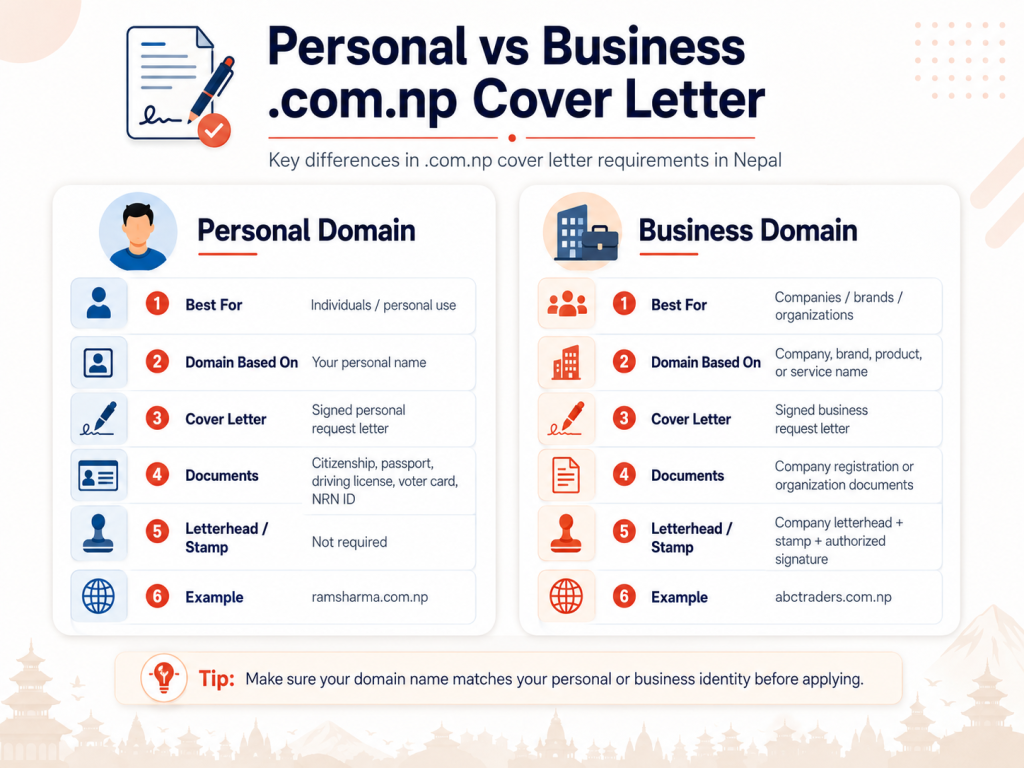
Depending on whether you are applying as an individual or as a business, the cover letter structure varies slightly.
Individual .com.np Domain
The applicant’s name is typically the basis for a personal.com.np domain.
For instance, if Ram Sharma is your official document name, your domain may be:
- Ram-sharma.com.np
- rsharma.com.np
- ramsharma.com.np
A valid identity document, such as a passport, driver’s license, voter card, NRN ID, or citizenship, must typically be uploaded for personal requests.
It should be made very clear in the cover letter that your own name is the reason for the domain request.
Business .com.np Domain
The registered company name, brand name, product name, or service name should be linked to a business.com.np domain.
For instance, the following domain choices would be appropriate if your business is registered as ABC Traders Pvt. Ltd:
- ABC.com.np
- abctraders.com.np
- abctradersnepal.com.np
The register may need company registration paperwork for commercial purposes. Typically, the cover letter should be stamped with the corporate seal, signed by an authorised individual, and on company letterhead.
This aids in demonstrating the domain request’s affiliation with a registered company.
How to Generate a .com.np Cover Letter Using BISUP
Follow these steps to create your cover letter using BISUP.
Step 1: Open BISUP NP Cover Letter Generator
Go to BISUP’s NP Cover Letter Generator page.
This tool is designed to help users create a proper cover letter for .np domain registration.
Step 2: Choose Personal or Business Request
Select whether you are applying as:
- Personal applicant
- Business or organization applicant
Choose the correct option because the document requirement and letter format may be different.
Step 3: Enter Your Domain Name
Enter your domain name correctly.
Example:
yourname.com.np
Do not write:
- https://yourname.com.np
- www.yourname.com.np
Only enter the domain name in the correct format.
Step 4: Enter Applicant Details
Enter your full name, address, phone number, and email address.
Use the exact name shown on your official document. If your document says Binayak Kumar Mahato, do not write only Binayak Mahato unless the domain and document can still be clearly matched.
Accuracy is very important for approval.
Step 5: Enter Nameservers
Nameservers connect your domain with your hosting provider.
For example:
Primary Nameserver: ns1.example.com
Secondary Nameserver: ns2.example.com
If you are using BISUP hosting, you can use the nameservers provided by BISUP.
Do not enter only an IP address. Use proper nameserver hostnames.
Step 6: Generate the Cover Letter
Click the generate button.
The tool will create a formal cover letter with your details.
Step 7: Review the Letter
Before downloading, check:
- Domain name spelling
- Applicant name
- Address
- Nameservers
- Letter format
- Personal or business request type
If something is wrong, correct the form and generate again.
Step 8: Download, Print, Sign, and Upload
Download the generated letter.
Then:
- Print the letter.
- Sign it.
- Add company stamp if it is a business request.
- Scan or take a clear photo.
- Upload it during .np domain registration.
Make sure the uploaded file is clear and readable.
How to Apply for a .com.np Domain in Nepal
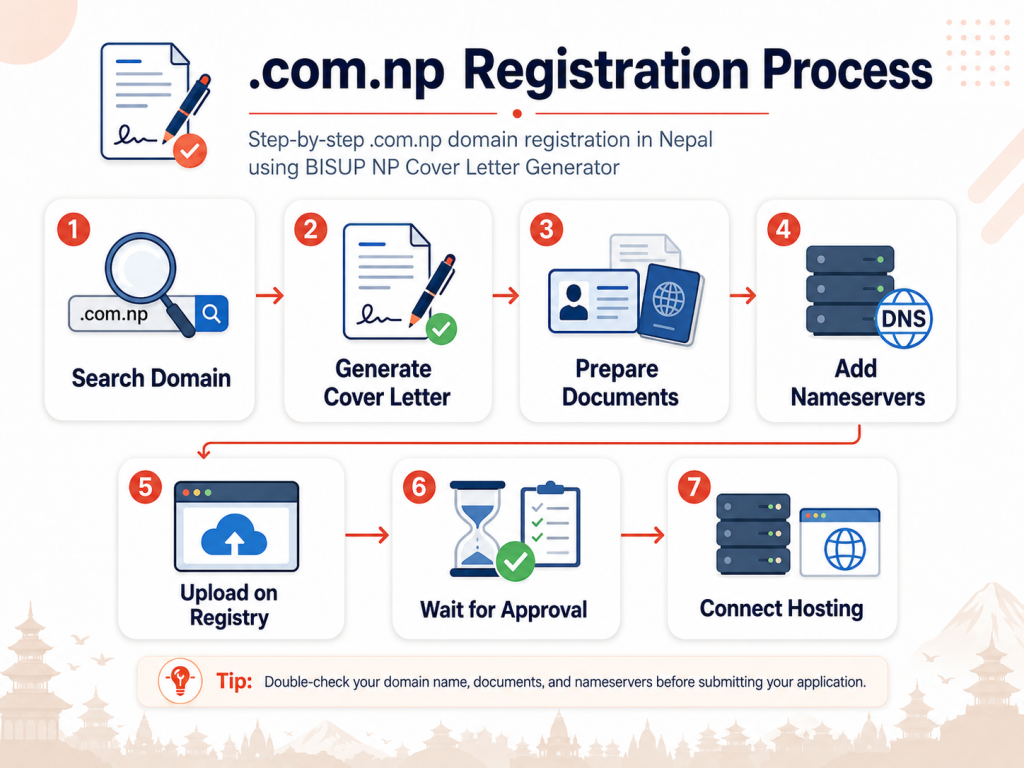
After preparing your cover letter, you need to apply through the official .np domain registration portal.
Here is the step-by-step process.
Step 1: Search Domain Availability
First, check whether your desired domain is available.
Enter only the domain name without:
wwwhttps://.com.np
For example, if you want yourbusiness.com.np, search only:
yourbusiness
Then select .com.np from the extension list.
If the domain is available, you can continue with registration. If it is not available, try another name that still matches your document, brand, product, or business.
Step 2: Create or Log In to Your Account
If you are a new user, create an account on the official .np registration portal.
Use an email address you can access because verification, correction requests, and approval updates may be sent there.
If you already have an account, log in and continue the registration process.
Step 3: Fill in Domain Registration Details
After logging in, fill in the required details carefully.
You may need to provide:
- Domain name
- Applicant name
- Administrative contact
- Technical contact
- Email address
- Phone number
- Address
- Nameservers
The admin contact should be the actual owner or authorized person.
Avoid using someone else’s details unless they are officially responsible for the domain.
Step 4: Add Valid Nameservers
Nameservers are required to connect your domain to hosting.
Examples of nameserver format:
ns1.example.comns2.example.com
If you are buying hosting from BISUP, you can ask BISUP for the correct nameservers.
Correct nameservers are important because invalid DNS details can delay your registration.
Step 5: Upload Required Documents
Upload the required documents based on your application type.
For Personal Domain
You may need:
- Signed cover letter
- Citizenship, passport, driving license, voter card, NRN ID, or accepted identity document
The requested domain should be based on your name as shown in the document.
For Business or Organization Domain
You may need:
- Signed cover letter
- Company registration certificate
- Organization registration document
- Letterhead
- Company stamp
- Authorized signature
The requested domain should be connected to the company name, organization name, product, service, brand, or trademark.
Make sure all files are clear, readable, and properly uploaded.
Step 6: Submit and Wait for Approval
After submitting the form and documents, wait for approval.
The registry reviews the application and verifies the documents. If everything is correct, the domain can be approved. If there is an issue, they may reject the request or ask for correction.
You should regularly check your email and dashboard status.
Common Mistakes That Cause .com.np Rejection
Many .com.np domain applications are rejected because of small avoidable mistakes.
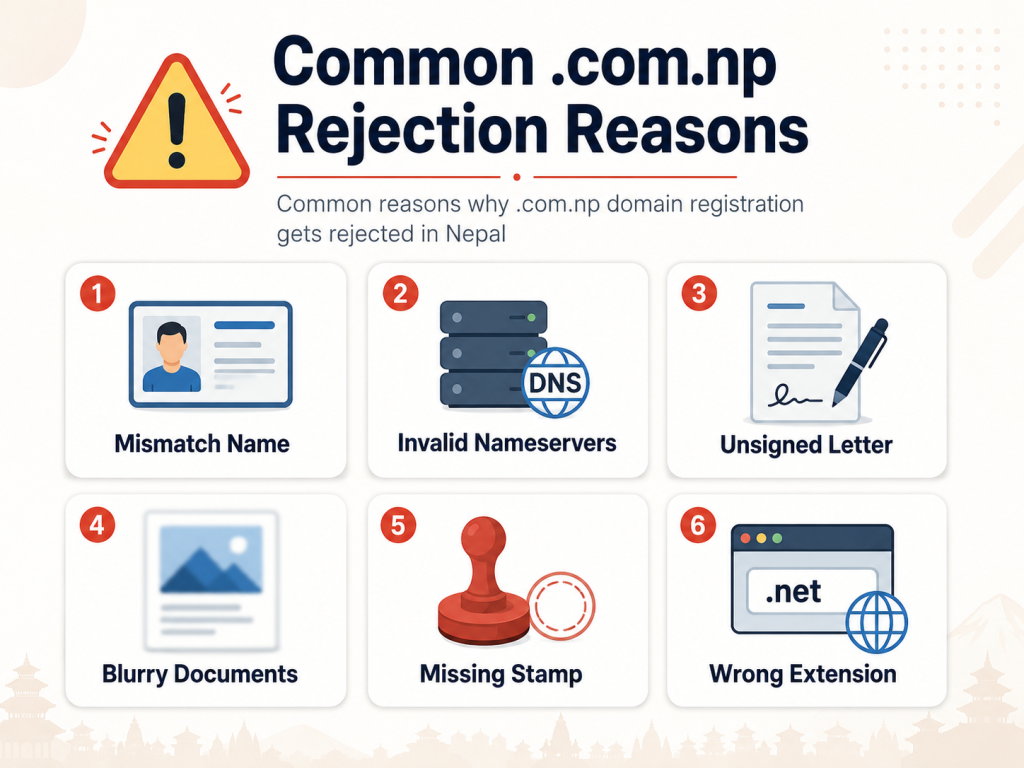
Here are the most common ones.
1. Domain Name Does Not Match the Applicant
The requested domain should be connected to the applicant’s name, company name, brand, product, or service.
For example, if your name is Sita Karki, applying for a completely unrelated generic domain may create rejection risk.
2. Wrong or Missing Cover Letter
A cover letter must clearly mention the requested domain name and applicant details.
If the letter is incomplete, unsigned, or unclear, the application may not be approved.
3. Invalid Nameservers
Nameservers should be valid hostnames.
Do not enter only an IP address.
Correct example:
ns1.example.com
Wrong example:
192.168.1.1
4. Blurry Documents
Uploaded documents should be clear and readable.
Avoid uploading cropped, dark, blurry, or incomplete document images.
5. Missing Company Stamp
For business applications, a company stamp and authorized signature may be required.
If the business letter does not look official, it can create verification issues.
6. Wrong Extension Selection
Choose the correct extension based on your purpose.
For example:
.com.npfor commercial/general use.org.npfor organizations.edu.npfor educational institutions.net.npfor network-related services.name.npfor personal names
Choosing the wrong extension can delay or reject your application.
7. Using Generic or Unrelated Names
A domain name should be connected to your identity, company, brand, product, or service.
Generic words or unrelated names may be difficult to approve.
Which .np Extension Should You Choose?
There are different .np extensions for different purposes.
| Extension | Best For | Example Use |
|---|---|---|
.com.np | Businesses, brands, individuals, services | Company website or personal website |
.org.np | Organizations, NGOs, associations | Non-profit or organization website |
.edu.np | Schools, colleges, education institutions | Academic institution website |
.net.np | Networks, portals, technical services | ISP, network, or portal |
.name.np | Personal name-based domains | Personal portfolio |
.info.np | Informational websites | Information portal |
For most businesses and individuals, .com.np is the most common choice.
What Happens After Your .com.np Domain is Approved?
After approval, your .com.np domain becomes active. But a domain alone does not create a website.
To make your website live, you need:
- Web hosting
- Nameserver configuration
- Website files or CMS
- SSL certificate
- DNS records
- Business email setup, if needed
This is where BISUP can help.
BISUP provides hosting services that can connect with your approved .com.np domain. After your domain is approved, you can point it to BISUP hosting and launch your website.
You can use your .com.np domain for:
- Business website
- WordPress website
- E-commerce store
- News portal
- Portfolio website
- Company email
- Landing page
- School or organization website
A .com.np domain gives you identity. Hosting makes that identity visible online.
Why Use BISUP for .com.np Domain and Hosting Setup?
BISUP helps clients with the complete process of going online.
Instead of only creating a cover letter, BISUP makes the process easier by helping users understand:
- How to write a correct .com.np cover letter
- Which document is required
- Which domain name is suitable
- Which extension to choose
- Which nameservers to use
- How to connect the domain with hosting
- How to launch the website after approval
BISUP’s free NP Cover Letter Generator is useful for anyone applying for a .com.np domain. It saves time, reduces formatting mistakes, and gives users a clean letter they can upload with their application.
BISUP also provides hosting services, so after your domain is approved, you can host your website, create business email, install WordPress, set up SSL, and make your website live.
.com.np Cover Letter Checklist
Before submitting your application, check these points:
- Domain name is correct
- Domain name matches your name, company, brand, product, or service
- Applicant name matches official document
- Cover letter is generated properly
- Cover letter is signed
- Company stamp is added for business request
- Nameservers are valid
- Documents are clear and readable
- Correct extension is selected
- Email address is active
- Uploaded files meet the portal requirement
- Application details match the uploaded documents
This checklist can help reduce rejection chances.
FAQ: .com.np Cover Letter and Domain Registration
What is a .com.np cover letter?
A .com.np cover letter is a formal request letter submitted during .np domain registration. It includes the applicant’s details, requested domain name, nameservers, and verification request.
Is .com.np domain registration free in Nepal?
Yes, .np domain registration is free through the official .np registry. However, you still need valid documents, a proper cover letter, and nameservers.
Can I generate a .com.np cover letter online?
Yes. You can use BISUP’s free NP Cover Letter Generator to create a properly formatted cover letter for .com.np domain registration.
What documents are required for personal .com.np registration?
For personal registration, you generally need a signed cover letter and an accepted identity document such as citizenship, passport, driving license, voter card, NRN ID, or eligible resident visa.
What documents are required for business .com.np registration?
For business registration, you generally need a signed cover letter, company or organization registration document, official letterhead, stamp, and authorized signature.
Do I need nameservers before applying for .com.np?
Yes, valid nameservers are usually required during the domain registration process. You can use nameservers provided by your hosting provider.
Can BISUP help after my .com.np domain is approved?
Yes. After approval, BISUP can help connect your domain with hosting, set up DNS, install SSL, create business email, and launch your website.
Why was my .com.np domain rejected?
Common reasons include domain-name mismatch, invalid nameservers, missing signature, blurry documents, wrong extension, missing company stamp, or unsupported domain name.
Summary
A .com.np domain is a great way for Nepal businesses, individuals, startups, and organizations to build a professional online identity. But to get approval, your application must be accurate.
You need a suitable domain name, valid documents, nameservers, and a properly written cover letter.
BISUP’s free NP Cover Letter Generator makes this process easier by helping you create a formal, ready-to-use cover letter for register.com.np submission. After your domain is approved, BISUP can also help you connect the domain with hosting and launch your website online.
Generate Your .com.np Cover Letter with BISUP
Ready to apply for your free .com.np domain?
Use BISUP’s free NP Cover Letter Generator to create your domain request letter in the correct format. Generate the letter, sign it, upload it with your documents, and complete your .np domain registration process.
After approval, choose BISUP hosting to connect your domain, launch your website, and build your online presence in Nepal.