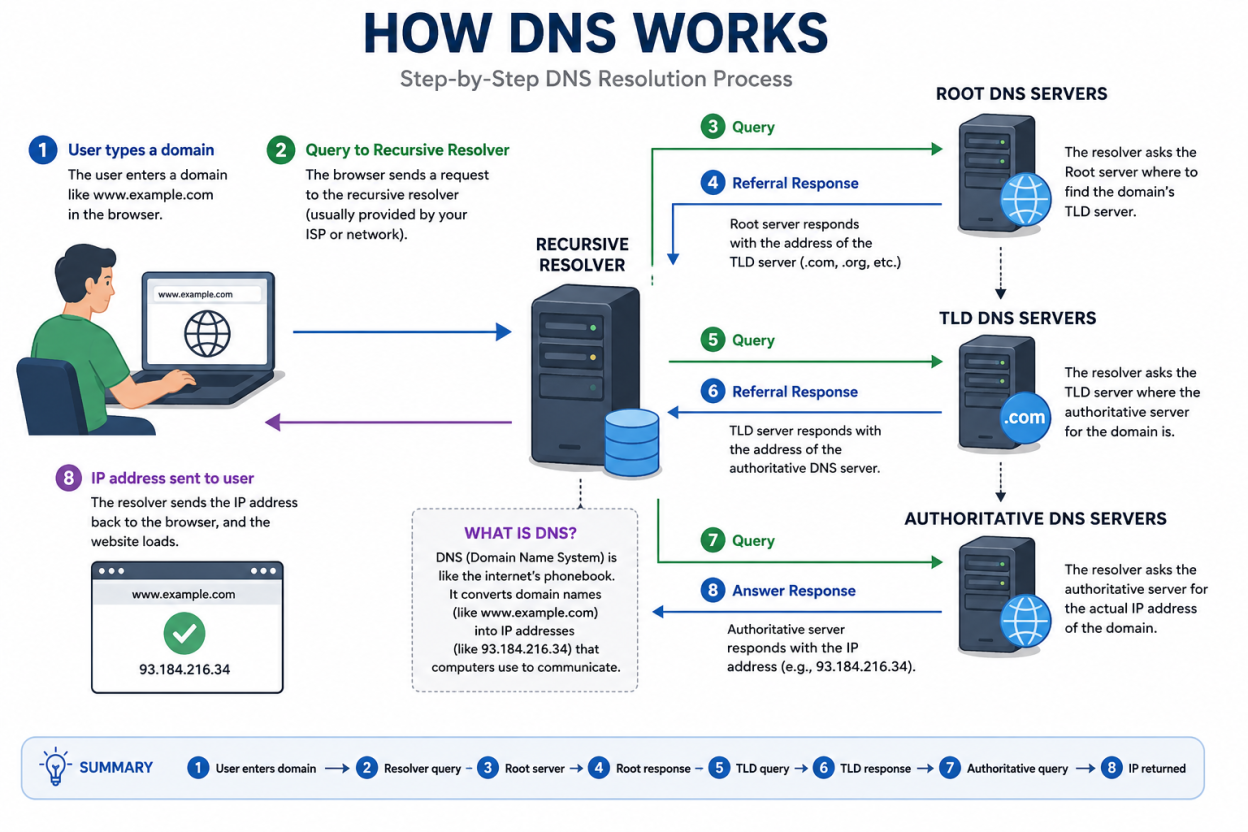
Every time you open a browser and type a web address, a hidden process kicks into gear. That process is called DNS, or the Domain Name System, and it is the reason you can type “example.com” instead of memorizing a string of numbers. Understanding how DNS works helps you troubleshoot slow websites, improve security, and make smarter decisions about your hosting setup.
What Is DNS?
In this guide, you will learn what DNS is, how a DNS lookup happens behind the scenes, which servers are involved, and why caching makes the whole system faster. We will also cover common DNS query types and answer frequent questions at the end.
DNS stands for Domain Name System. Think of it as the internet’s address book. Humans remember words far better than numbers, so we use domain names like nytimes.com or espn.com to reach websites. Computers, however, communicate using IP addresses.
An IP address is a unique numerical label assigned to every device connected to a network. In IPv4, an address looks like 192.168.1.1. Because the internet has grown so large, many networks now rely on IPv6, which uses longer alphanumeric addresses such as 2400:cb00:2048:1::c629:d7a2 to support billions of additional devices.
Without DNS, you would need to memorize a unique number for every website you want to visit. That is simply not practical. DNS translates the domain name you type into the IP address your device needs, and it does this in a fraction of a second, often in well under 100 milliseconds.
How Does DNS Work? A Step-by-Step Breakdown
A DNS lookup is the process of converting a readable domain name into a machine-friendly IP address. Although this happens automatically, several systems work together behind the scenes to make it possible.
If you’re looking for a domain for your business or personal website, you can search and register your preferred domain name through Bisup.
👉 Find and register your domain: Register a Domain with Bisup
Here is what typically happens when nothing is cached yet:
- You type a domain name into your browser, and the request is sent to a DNS recursive resolver.
- The resolver contacts a root nameserver to find out where to look next.
- The root server points the resolver toward the correct top-level domain (TLD) server, such as the one that manages all “.com” domains.
- The resolver queries that TLD server directly.
- The TLD server responds with the address of the domain’s authoritative nameserver.
- The resolver sends a final request to that authoritative nameserver.
- The authoritative nameserver returns the correct IP address.
- The resolver delivers that IP address back to your browser.
Once your browser has the IP address, it sends an HTTP or HTTPS request straight to the web server, which then loads the page you asked for. This entire sequence, from typing a URL to seeing a rendered page, usually takes less than a second on a healthy connection.
The Four Key Servers Behind Every DNS Query
Several distinct server types cooperate during DNS resolution. Each one plays a specific role, similar to how different departments in a library help you find one particular book.
DNS Recursive Resolver
The recursive resolver is the first stop for any DNS query. It receives the request from your device and takes responsibility for tracking down the answer. If it does not already have the answer cached, it reaches out to other servers on your behalf and returns the final result once it is found.
Internet service providers, along with public services like Google Public DNS and Cloudflare’s 1.1.1.1, all operate recursive resolvers that handle billions of queries daily.
Root Nameserver
The root nameserver sits at the very top of the DNS hierarchy. There are only 13 named root server addresses globally, though each is backed by hundreds of physical machines distributed worldwide through anycast routing. Its job is simple: point the resolver toward the correct TLD server.
TLD Nameserver
The top-level domain nameserver manages a specific domain extension, such as .com, .org, or .net. When a query for example.com arrives, the TLD server for “.com” responds with the location of the domain’s authoritative nameserver, narrowing the search significantly.
Authoritative Nameserver
This is the final destination in the lookup chain. The authoritative nameserver holds the actual DNS records for a domain, such as its A record or CNAME record, and returns the exact IP address needed. If a subdomain like blog.example.com is requested, an additional nameserver step may be involved to resolve the CNAME record for that subdomain.
Recursive Resolver vs Authoritative Server: What Is the Difference?
People often confuse these two roles, but they sit at opposite ends of the DNS lookup chain.
A recursive resolver acts as a middleman. It does not store the original DNS record; instead, it tracks down the answer by querying other servers until it finds one. Once it has the result, it may cache that data temporarily to speed up future requests.
An authoritative nameserver, on the other hand, is the definitive source. It owns the DNS records for a domain and can answer a query directly, without needing to ask any other server. This distinction matters when diagnosing DNS propagation delays or configuration errors.
Types of DNS Queries Explained
DNS resolution relies on three distinct query types, and understanding them helps explain why some lookups are faster than others.
- Recursive query: The client asks a DNS server to return either the complete answer or an error. The resolver does all the heavy lifting on the client’s behalf.
- Iterative query: The server returns the best answer it currently has. If it cannot fully resolve the request, it points the resolver toward another server that might know more, and this continues down the chain.
- Non-recursive query: The server already has the answer, either because it is authoritative for that record or because the record exists in its cache. This is the fastest query type since no further searching is needed.
What Is DNS Caching, and Why Does It Matter?
DNS caching stores previously resolved DNS data closer to the user so that future requests skip several steps entirely. This reduces load times, cuts bandwidth usage, and lowers the burden on upstream servers.
Caching happens at multiple layers:
- Browser cache: Modern browsers such as Chrome store DNS records locally for a short period. You can inspect this directly by visiting chrome://net-internals/#dns.
- Operating system cache: Your device runs a small program called a stub resolver, which checks its own local cache before sending a request out to your ISP’s recursive resolver.
- ISP resolver cache: Internet service providers maintain large caching layers that store recent lookups, often serving millions of users from the same cached record.
Every cached DNS record has a time-to-live (TTL) value, measured in seconds, that determines how long it stays valid before the resolver must ask again. Lower TTLs offer more flexibility for making quick DNS changes, while higher TTLs reduce server load and speed up repeat visits.
Why DNS Performance Affects SEO and User Experience
Slow DNS resolution adds latency before a page even starts loading, which can hurt Core Web Vitals scores and frustrate visitors. Choosing a fast, reliable DNS provider and setting sensible TTL values are simple but effective ways to improve site speed. If your website already uses a CDN, pairing it with an optimized DNS setup often delivers the biggest performance gains.
Why do we need DNS if computers use IP addresses?
Humans find words easier to remember than long strings of numbers. DNS bridges that gap so people can type simple domain names instead of memorizing IP addresses.
How long does a typical DNS lookup take?
An uncached DNS lookup usually completes in well under a second, often in under 100 milliseconds. Cached lookups are even faster since they skip most of the resolution steps.
What does DNS stand for? DNS stands for Domain Name System. It converts human-readable domain names into the IP addresses that computers use to locate each other on a network.
Frequently Asked Questions About DNS
What happens if a DNS server goes down?
Most DNS infrastructure uses redundant servers spread across the globe. If one server becomes unavailable, the resolver automatically tries another, which keeps the internet running smoothly for most users.
Can I change my DNS provider?
Yes. Many people switch to public DNS resolvers, such as 1.1.1.1 or 8.8.8.8, for faster speeds or added privacy. This change is usually made in your device or router network settings.
What is a TTL in DNS?
TTL, or time-to-live, tells a resolver how long it should keep a DNS record cached before checking for updates again. It is measured in seconds and set by the domain’s authoritative nameserver.
Final Thoughts
DNS quietly powers nearly every action you take online, from checking email to streaming video. By understanding how DNS works, including the servers involved, the query types, and the role of caching, you gain a clearer picture of what happens in the moments before a webpage loads. This knowledge also makes it easier to troubleshoot slow sites, choose a faster resolver, or fine-tune your own domain’s DNS settings for better performance.