
Quick Answer: The best Django hosting for beginners in 2026 is managed shared hosting with Python support, starting at $2.93 per month on Bisup Business. It removes server administration entirely. AWS and bare VPS plans offer more power but demand Linux, WSGI, and security skills that beginners do not need for a first deployment.
Django hosting for beginners has a discovery problem. Search the topic and the results push AWS, DigitalOcean, and Kubernetes tutorials. Those platforms are excellent. They are also the wrong first step for someone shipping a first Django project.
A beginner needs three things: a Python environment that already works, a database, and a way to point a domain at the app. Managed hosting with Django support delivers all three without a single SSH command. This guide shows what to pick, what it costs, and how the deployment actually works.
Why AWS Is Overkill for Your First Django App?
AWS gives you infrastructure, not hosting. You provision an EC2 instance, harden the firewall, install Python and a WSGI server like Gunicorn, configure Nginx as a reverse proxy, set up a PostgreSQL or MySQL instance, and manage security patches forever.
Each step is a potential failure point. Furthermore, a misconfigured instance can generate surprise bills, and an unpatched one becomes a security risk. Industry surveys consistently rank misconfiguration among the top causes of cloud breaches. For a portfolio project, a client site, or a small SaaS prototype, that operational load buys you nothing.
What Django Hosting for Beginners Should Include?
- A Python application manager in the control panel, so you create the app through a form rather than a terminal.
- WSGI support out of the box, since Django serves through WSGI or ASGI in production.
- MySQL or PostgreSQL databases included in the plan price.
- Free SSL, because Django sites handle logins and forms that must run over HTTPS.
- SSH access for running migrations and installing packages from requirements.txt.
- Daily backups, so a broken deployment never destroys your data.
Django Hosting Cost Comparison in 2026
| Option | Monthly cost | Server admin needed | Best for |
| Bisup Business (shared, Django support) | $2.93 (36 mo term) | None | First deployments, client sites, portfolios |
| Bisup Enterprise | $3.85 (36 mo term) | None | Multiple Django apps, unlimited databases |
| Managed platform (Heroku style) | $5 to $25 | None | Teams that want git push deploys |
| Unmanaged VPS | $5 to $30 | Full | Developers comfortable with Linux |
| Bisup Professional VPS | $29.99 | Full (root access) | Production apps needing 8 vCPU and 16 GB RAM |
The Bisup Business plan includes 4 GB RAM, 30 GB NVMe storage, 25 MySQL databases, and unmetered bandwidth alongside Django and Node.js support. For context, that entry price is lower than a single hour of many cloud consultants who would set up AWS for you.
How to Deploy Django on Managed Hosting? 6 Steps
The workflow below applies to cPanel based hosting with a Python application manager. It takes most beginners under 30 minutes.
- Step 1: Create a Python application in cPanel and select your Python version.
- Step 2: Upload your project files through Git or the file manager.
- Step 3: Install dependencies by pointing the app manager at requirements.txt.
- Step 4: Create a MySQL database and update settings.py with the credentials.
- Step 5: Run migrations and collectstatic through the built in terminal.
- Step 6: Restart the application and confirm the site loads over HTTPS.
Common beginner errors include DEBUG left as True in production, a missing ALLOWED_HOSTS entry, and static files that never got collected. Fix those three and most first deployments succeed. When traffic grows past roughly 50,000 monthly visits, upgrade to a VPS rather than fighting shared resource limits.
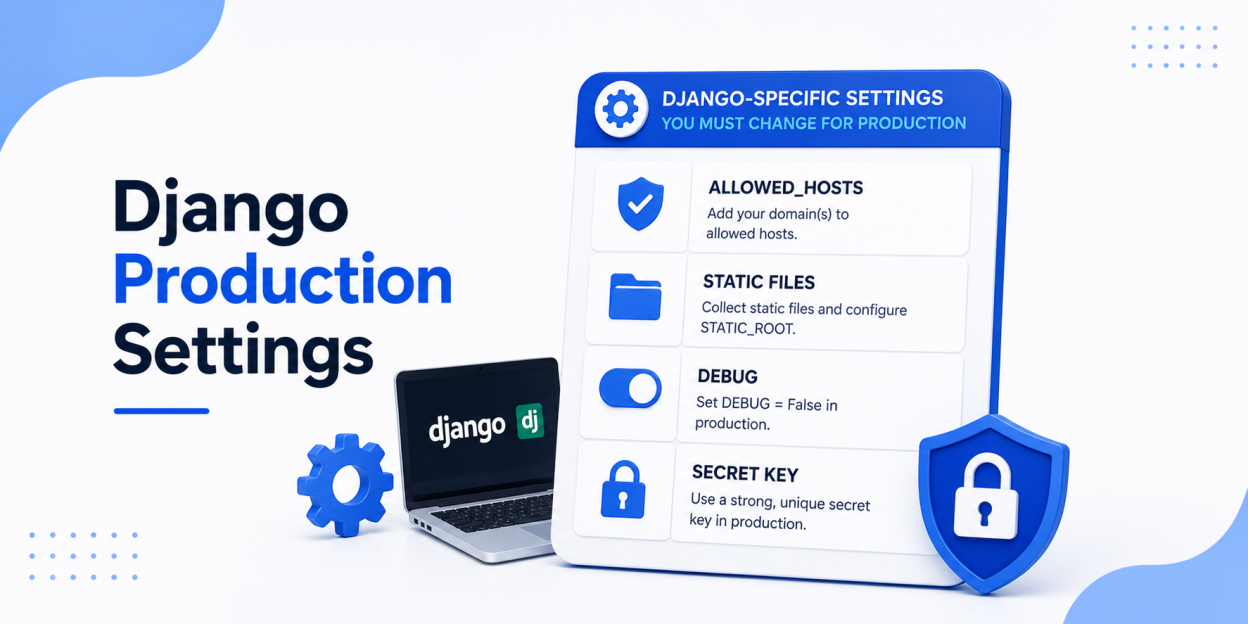
Django Production Settings You Must Change Before Launch
A Django project that works locally is not production-ready by default. Update these settings before pointing real traffic at it:
- Set DEBUG = False. Debug pages can expose source code, environment details, settings, and local variables.
- Set ALLOWED_HOSTS to the real domain names, such as example.com and www.example.com. Avoid a wildcard unless you also validate the Host header upstream.
- Load SECRET_KEY from an environment variable. Use a long, random production-only value and never commit it to Git.
- Define STATIC_ROOT and STATIC_URL, then run python manage.py collectstatic so the web server can serve CSS, JavaScript, and images outside Django’s development server.
- Protect HTTPS cookies by setting SESSION_COOKIE_SECURE = True and CSRF_COOKIE_SECURE = True after HTTPS is working.
- Configure production database credentials, backups, logging, and error monitoring separately from development settings.
DEBUG = False
ALLOWED_HOSTS = [“example.com”, “www.example.com”]
SECRET_KEY = os.environ[“SECRET_KEY”]
STATIC_URL = “/static/”
STATIC_ROOT = BASE_DIR / “staticfiles”
Finally, run python manage.py check –deploy against the production settings. Django’s official deployment checklist covers the security, HTTPS, database, static-file, and logging settings that commonly differ between local and production environments.
Frequently Asked Questions
Yes, if the plan explicitly supports Python applications. Bisup Business and Enterprise shared plans include Django support with WSGI configuration handled through cPanel.
Managed Django hosting starts at $2.93 per month on a 36 month term. Unmanaged VPS options start around $5 but require Linux administration skills.
No. Django works well with MySQL, which shared plans include. PostgreSQL is preferred for advanced features, and you can adopt it later on a VPS.
Move when you need background workers, ASGI websockets, or sustained traffic above roughly 50,000 monthly visits. A VPS with root access, like the $29.99 Bisup Professional plan, handles that stage.


