Fast deployment, scalability, and effective resource use are necessary for modern applications. One of the most frequent queries when organising your infrastructure is:
Which is better, Virtual Machines (VMs) or Docker containers?
Although they accomplish isolation in distinct ways and have different uses, both technologies aid in the operation of applications in isolated environments. Performance, security, operating expenses, and implementation speed can all be greatly impacted by the choice of solution.
We’ll thoroughly evaluate Docker and virtual machines, examine their advantages and disadvantages, and assist you in selecting the best option for your application in this article.
What is a Virtual Machine?
A software-based computer that operates on top of actual hardware is called a virtual machine (VM).
A virtual machine comprises:
- Virtual RAM and CPU
- Virtual Network Interface and Virtual Storage
- An entire operating system
A hypervisor, which stands between the hardware and virtual machines, is used to generate and manage virtual computers.
Some well-known hypervisors are:
Microsoft Hyper-V KVM Xen VMware ESXi Proxmox VE How VMs Operate
Many virtual computers can be hosted on a physical server. With its own operating system, every virtual machine (VM) runs autonomously.
Example:
Physical Server
├── VM 1 (Ubuntu Server)
├── VM 2 (Windows Server)
└── VM 3 (CentOS Server)
Every virtual machine functions as a distinct computer.
Advantages of Virtual Machines
- Strong seclusion
- supports a variety of OS systems
- Perfect for outdated software
- Simple host migration
- Ideal for corporate settings
Typical VM Use Cases
- Using Linux infrastructure to host Windows applications
- Using outdated software
- servers for databases
- Applications for businesses
- Hosting environments with many tenants
What is containerisation and Docker?
Applications and their dependencies are packaged into lightweight containers using the containerisation platform Docker.
Containers don’t need a whole operating system, in contrast to virtual machines.
Rather, the kernel of the host system is shared among containers.
The Operation of Containers
Docker bundles:
- Libraries for application code
- Relationships
- Environment of runtime
into a single image of a container.
After that, the container can function reliably in many settings.
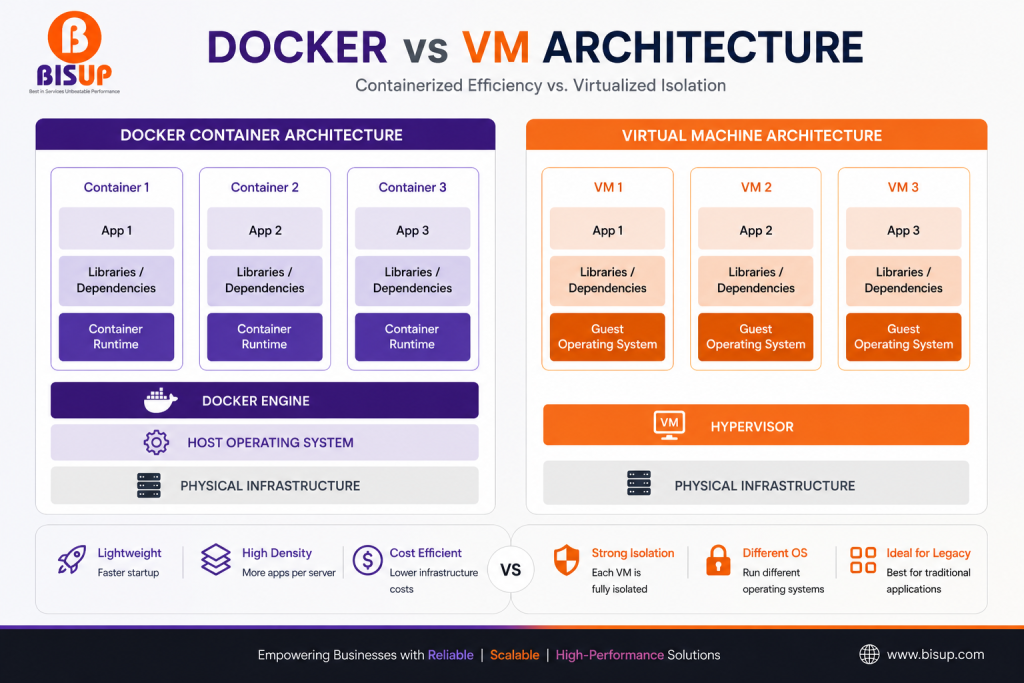
IMAGE 1: Docker vs VM Architecture Diagram
Suggested image showing:
Virtual Machine Architecture
Hardware
↓
Hypervisor
↓
Guest OS
↓
Application
Docker Architecture
Hardware
↓
Host OS
↓
Docker Engine
↓
Containers
Advantage of Shared OS Kernels
Given that the host operating system kernel is shared by containers:
Startup times are significantly quicker.
There is less use of resources.
The same server can handle several workloads.
One of the main reasons Docker has gained popularity among developers and DevOps teams is its efficiency.
Advantages of Docker
- Lightweight
- Quick setup
- Transportable
- Simple scaling
- Outstanding for CI/CD processes
Docker vs VM — Full Comparison Table
| Feature | Docker Containers | Virtual Machines |
|---|---|---|
| Startup Time | Seconds | Minutes |
| Size | MBs | GBs |
| Resource Usage | Low | High |
| Performance | Near-native | Slight overhead |
| Isolation | Process-level | Hardware-level |
| Security | Good | Stronger |
| Portability | Excellent | Good |
| Cost Efficiency | High | Moderate |
| OS Flexibility | Same Kernel | Any OS |
| Scalability | Very High | Moderate |
| Deployment Speed | Very Fast | Slower |
| Best For | Modern Apps | Legacy Systems |
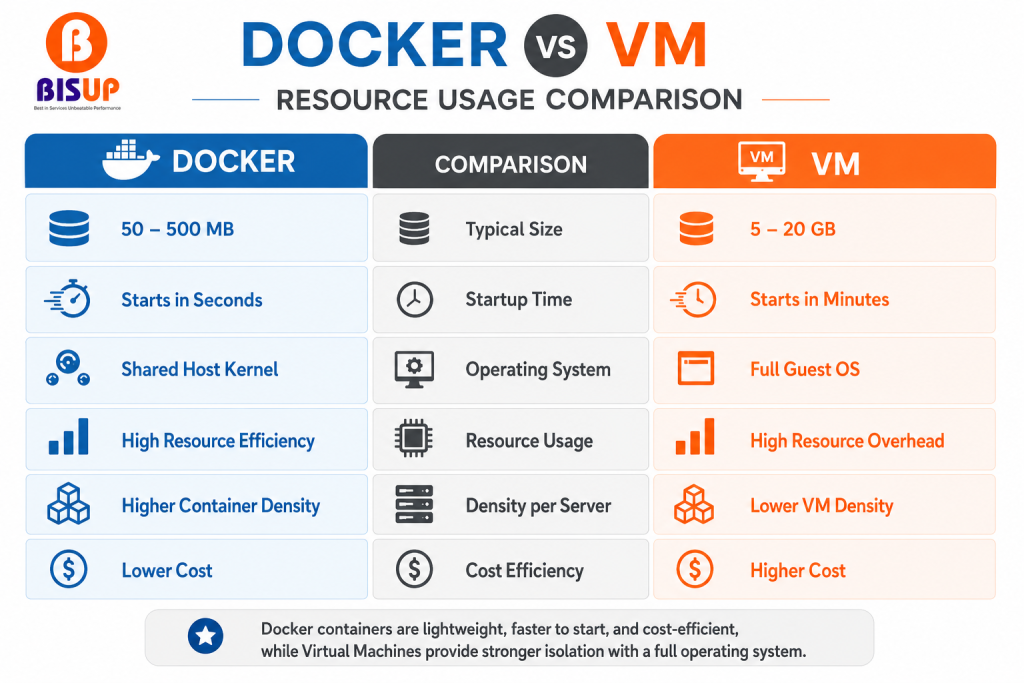
Image 2: Docker vs VM Resource Usage Comparison
Performance
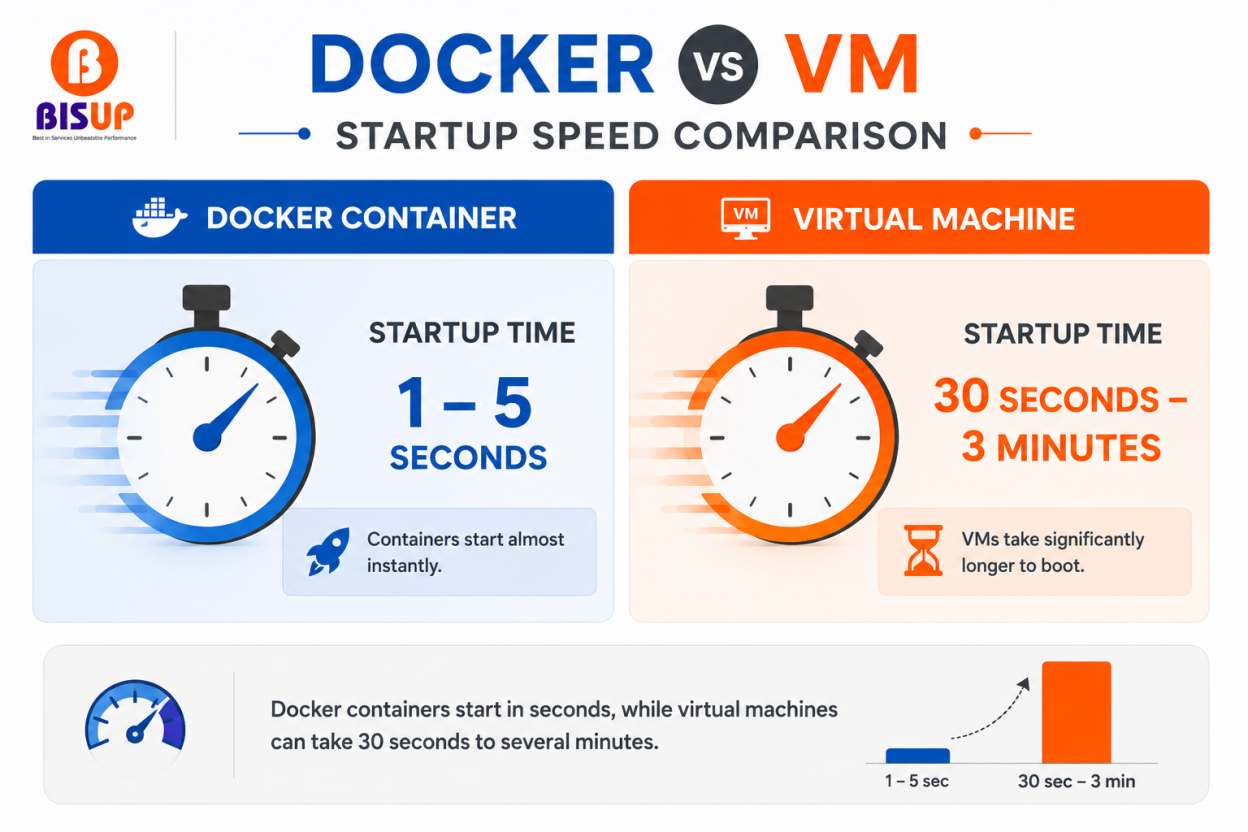
Docker containers launch really quickly.
A virtual machine typically takes several minutes to boot, whereas a containerised application can be deployed in a matter of seconds.
Efficiency of Resources
Because virtual machines (VMs) come with a full operating system, they use:
More RAM, more CPU, and more storage
This overhead is avoided with containers.
Safety
Because each virtual machine (VM) has its own operating system, they offer greater separation.
The impact is usually confined to the exploited virtual machine (VM).
Although containers offer isolation, they share the host kernel; configuration is crucial.
Transportability
Docker is very portable.
An identical container image created on a developer’s laptop can operate in:
- Cloud environments for testing, staging, and production
When to Make Use of Docker
When speed, scalability, and consistency are important, Docker is the best option.
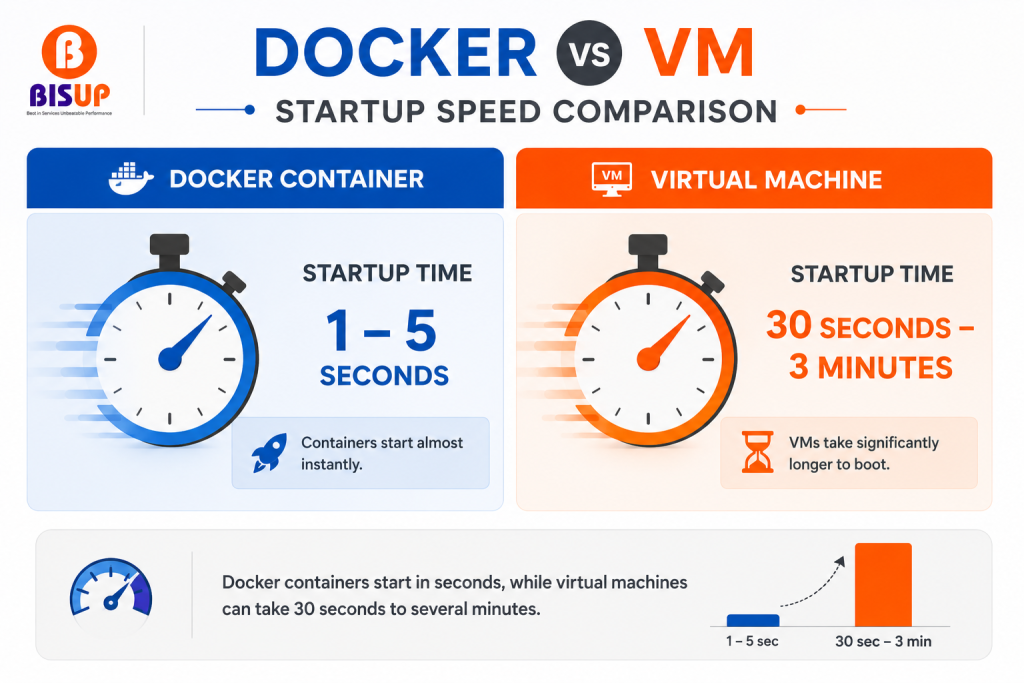
Image 3: Container Startup Speed Comparison
Microservices
Microservices are being used more and more in the development of contemporary apps.
Every service is capable of operating within a separate container.
For instance:
- Database Proxy, API, Authentication, and Payment Services
It is possible to update each component separately.
Environments for Development
Docker solves the traditional issue:
“It works on my machine.”
Docker images allow developers to share identical environments.
Pipelines for CI/CD
Docker easily integrates with:
Actions on GitHub
Azure DevOps Jenkins GitLab CI/CD
Consistent builds are guaranteed in all environments thanks to containers.
Stateless Uses
Docker is incredibly useful for:
Backend services, web apps, and APIs
Front-end programs
Well-known instances
Nginx, Node.js, Django, Laravel, and Spring Boot
Cloud-Based Programs
The majority of contemporary cloud platforms use containers extensively.
For instance:
OpenShift, Docker Swarm, and Kubernetes
ECS on Amazon
When to Make Use of a Virtual Machine
Even with Docker’s widespread use, virtual machines (VMs) are still essential in many situations.
Managing Several Operating Systems
Let’s say you have a Linux server but require:
Active Directory Windows Server Windows Applications
You need a virtual machine.
Applications from the Past
A large number of older business apps were created especially for virtual machines.
It can be challenging or impossible to migrate them to containers.
Strict Security Standards
sectors like:
Banking, Healthcare, and Government
frequently favour isolation at the VM level.
Workloads that are Stateful
Examples consist of:
ERP systems and enterprise databases
Controllers of domains
In virtual machines, these are frequently simpler to handle.
Can You Use Both? (Docker Inside a VM)
Absolutely.
In fact, this is one of the most common production architectures today.
Best of Both Worlds
Many organizations deploy:
Physical Server
↓
Hypervisor
↓
Ubuntu VM
↓
Docker Engine
↓
Containers
This provides:
- VM-level isolation
- Docker flexibility
- Easy scaling
- Better security
Real-World Example
A company hosts its infrastructure on a virtualization platform.
The setup might look like:
Proxmox Host
├── VM 1 (Docker Web Apps)
├── VM 2 (Database Server)
├── VM 3 (Monitoring Stack)
└── VM 4 (Backup Server)
Inside VM 1:
- Nginx Container
- Node.js Container
- Redis Container
- API Container
This architecture is widely used because it combines the strengths of both technologies.
Getting Started with Docker on Ubuntu
Installing Docker on Ubuntu is straightforward.
Update the System
sudo apt update
sudo apt upgrade -y
Install Docker
curl -fsSL https://get.docker.com | sudo bashVerify Installation
docker --versionRun Your First Container
docker run hello-worldIf successful, Docker will download and execute the Hello World container.
Run an Nginx Web Server
docker run -d \
--name nginx \
-p 80:80 \
nginx
Check:
http://YOUR_SERVER_IPYou should see the Nginx welcome page.
Official Documentation
For the latest installation instructions and best practices, refer to: Docker Documentation
Which One Is Best for You?
Your needs will determine the response.
Select Docker if you require:
- Quick deployments
- Effective use of resources
- Integration of CI/CD
- Applications that are cloud-native
- Architecture for microservices
Select virtual machines if you require:
- Several operating systems
- Support for legacy applications
- Robust isolation of enterprise workloads
If you would want, select Docker inside a virtual machine:
- Scalability, Flexibility, and Security
- Contemporary DevOps processes
In 2026, a Docker-based deployment operating inside virtual machines offers the finest combination of security, performance, and ease of use for the majority of contemporary apps.
Common Questions
Q. Is a virtual machine (VM) less safe than Docker?
Not always.
Because each virtual machine (VM) has its own operating system, they typically offer greater isolation. Because Docker containers share the host kernel, improper configuration may raise risk.
Nevertheless, Docker can be extremely safe when used with:
- Very few pictures of containers
- Appropriate authorisation
- Scanning for security
Q. Host hardening: Does Docker take the role of virtual machines?
No.
Virtual machines and Docker address distinct issues.
Whereas virtual machines (VMs) concentrate on operating system separation and infrastructure virtualisation, Docker concentrates on application packaging and deployment.
The majority of contemporary manufacturing settings combine the two technologies.
Q. Is Docker quicker than a virtual machine?
Yes.
Because they don’t need an entire operating system, containers usually launch in a matter of seconds and use fewer resources.
Q. Can Windows apps be run by Docker?
The host operating system kernel is typically shared by Docker containers.
Linux containers need a Linux host, whereas Windows containers need a Windows host.
A virtual machine is typically a preferable choice for complete Windows program support on Linux infrastructure.
Q. Should Docker be used by small businesses?
True.
Docker is a great option for startups and small businesses since it may lower infrastructure costs, make deployments easier, and increase scalability.
Conclusion
Virtual machines and Docker are complimentary technologies rather than rivals. Docker offers speed, portability, and effective resource usage, whereas virtual machines offer robust isolation and operating system flexibility.
Docker is frequently the recommended option for contemporary applications, particularly cloud-native workloads. Virtual machines continue to be essential for environments demanding strong isolation, enterprise workloads, and older systems.
Running Docker containers within protected virtual machines is frequently the most feasible design in 2025. This method gives businesses the best of both worlds by combining the security of virtualisation with the performance of containers.