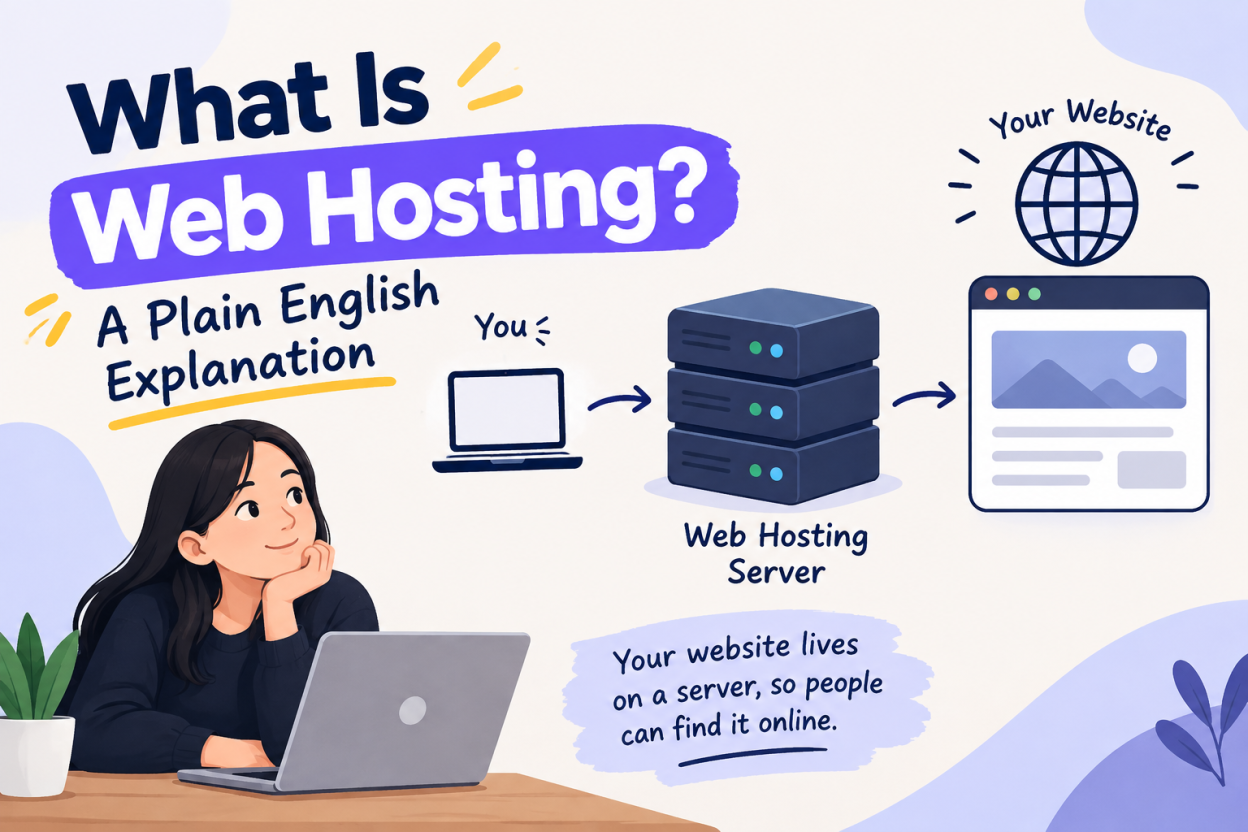
Web hosting is a service that stores your website’s files on a server connected to the internet, so anyone can load your site by typing your domain name. You rent space and resources on that server. The host keeps it powered, connected, patched and reachable.
If you have started shopping for a website, you have hit a wall of terms nobody explained. This article answers what is web hosting in plain language, then gives you the vocabulary you need to compare plans without guessing.
How web hosting works, step by step
A website is a set of files: pages, images, stylesheets, scripts and usually a database. Those files have to live on a computer that is switched on and connected to the internet at all times. That computer is a server. Renting space on it is web hosting.
Here is what happens when somebody visits your site.
- They type your domain name into a browser.
- The browser asks the domain name system where that domain points.
- DNS answers with an IP address, which is the numeric address of your server.
- The browser connects to that server and requests the page.
- The server sends back the files, or builds the page from a database first.
- The browser assembles everything and displays your site.
All of that usually takes under a second. Your host is responsible for steps 4 and 5 being fast and reliable. If step 2 interests you, DNS records explained covers what each record type does.
Domain and hosting are two different things
This is the most common beginner confusion, so it is worth being blunt about.
A domain name is your address. It is what people type. You rent it from a registrar, normally by the year.
Hosting is the building. It is where your files actually sit.
You can buy them from the same company or from different ones. They are separate services either way. A domain without hosting points nowhere. Hosting without a domain is reachable only by IP address, which nobody is going to type.
Connecting them means updating your domain’s DNS so it points at your host. That is usually a nameserver change, and it takes anywhere from a few minutes to a few hours to spread across the internet. Our guide to pointing a domain at your hosting walks through both methods and the timing.
What you are actually renting
When you buy a hosting plan, you are renting a share of several things at once.
Storage. Disk space for your files and database, measured in gigabytes. Most small sites use far less than people expect. A typical WordPress blog with a few hundred posts sits comfortably under 5 GB.
Bandwidth. The volume of data your server sends to visitors. Often advertised as unmetered, which means no hard counter, not no limit. The real limit lives in the fair use policy.
CPU and memory. Processing power and RAM. This is the resource that actually runs out first on busy sites, and it is the one hosts advertise least clearly.
Software. The web server, a PHP version, a database engine, and usually a control panel like cPanel or DirectAdmin.
Services. SSL certificates, email accounts, backups and support.
The main types of hosting
You will see four or five categories on every hosting site. The differences come down to how much of the server is yours.
Shared hosting. Your site sits on a server alongside many other accounts, sharing CPU, memory and disk throughput. It is the cheapest option and it genuinely suits most small sites. The constraint is a resource ceiling, and a noisy neighbour can occasionally affect you. See shared hosting explained for what those ceilings actually are.
WordPress hosting. Shared or virtual hosting with WordPress tooling added: automatic updates, staging, server-level caching. You pay a premium for convenience.
VPS hosting. A guaranteed slice of a physical server, with resources reserved for you and root access if you want it. More control, more responsibility, more cost.
Cloud hosting. Your site runs across pooled infrastructure instead of one machine, so a single hardware failure does not take you offline. It scales quickly and bills differently.
Dedicated hosting. A whole physical server. Rarely necessary for a small business.
Most websites start on shared hosting and stay there for years. Moving up is a decision you make when your resource usage tells you to, not when a sales page suggests it.
What a good host does that you never see
Plenty of the value in hosting is invisible when things work.
Keeps the machine running. Redundant power, cooling, network links and hardware monitoring.
Patches the software. Operating system and server updates, applied without taking your site down.
Isolates accounts. On a shared server, a compromise in one account should not reach yours. Proper isolation is a real engineering job.
Filters attacks. Network-level DDoS mitigation and firewalls, usually before the traffic reaches your server at all.
Takes backups. Ideally daily, ideally stored somewhere other than the same machine.
Answers when something breaks. Support quality is the single biggest practical difference between two hosts at the same price.
What hosting does not do
Worth stating plainly, because it surprises people.
Your host does not build your website. It does not write your content. It does not usually fix your WordPress plugins, because those are your application, not the server. It cannot make an insecure password safe, and it cannot rescue a site with no backups if you deleted them.
Hosting is infrastructure. What you put on it is yours.
The vocabulary you will meet on a pricing page
Uptime. The percentage of time the server is reachable. 99.9 percent allows about 43 minutes of downtime a month.
SSL certificate. Enables HTTPS and the padlock. Free certificates from Let’s Encrypt are fine for most sites.
cPanel, DirectAdmin, Plesk. Control panels. They are the interface you use to manage files, databases, email and domains.
NVMe. A fast storage type. Better than older SATA SSDs, though the visible difference depends on the rest of the stack.
Nameservers. The DNS servers your domain points at, which in turn direct traffic to your host.
Inodes. A count of files and folders, capped on many shared plans. Usually only a problem for sites with huge media libraries or a lot of cached files.
Renewal price. The price after your introductory term ends. This is the number that actually matters, and it is often several times the advertised rate.
How much you should expect to pay
Prices vary enormously by market and by term length, so treat any specific figure with a verification date attached. What is consistent is the structure: hosting is sold at a steep introductory discount, usually on a one, two or three year prepayment, and it renews higher.
Before buying anything, find the renewal price and multiply out three years. That single calculation prevents the most common regret in this category. We cover it fully in how much web hosting should cost.
Choosing your first plan
For a first website, the checklist is short.
- Entry shared hosting is almost certainly enough.
- Confirm free SSL is included and renews automatically.
- Confirm daily backups and check how far back they go.
- Confirm the renewal price before you check out.
- Pick a data centre close to your audience.
- Test the support chat with one technical question.
If a host will not answer those six, you have learned something useful for free. For the longer version of that process, read how to choose a web host, then compare it against our web hosting plans.
Frequently asked questions
It is renting space on a computer that stays connected to the internet, so your website files are always available when someone types your domain name.
Yes, unless you use a platform that includes hosting in its subscription, such as a hosted site builder or a managed store platform. Those bundle the hosting into the price rather than removing the need for it.
No. The domain is your address and the hosting is the space your files sit in. They are separate services that you connect together through DNS.
Entry-level shared hosting is the cheapest tier and is sufficient for most first websites. Compare renewal prices rather than introductory rates, because the gap between them is often large.
Yes. Most hosts migrate incoming sites free of charge, and you can take a full account backup yourself if your host uses a standard control panel. Check that before you buy.
Your site becomes unreachable until service is restored. Check whether the uptime guarantee has an actual remedy attached, and keep your own off-server backup so you are never dependent on one provider’s recovery